Ending a professional email can feel daunting, but it really doesn’t have to be. The right closing can strengthen your message and encourage responses, making your communication feel more engaging. Whether it's a quick note to a colleague or a formal request to a client, how you wrap up your email matters—it leaves a lasting impression that can impact future interactions.

A well-considered closing can showcase your professionalism while also being personable. You want to strike the right balance between courteous and approachable, ensuring that the recipient feels valued and ready to respond. Understanding what to say can transform a simple email into a meaningful dialogue.
In the world of business communication, every detail counts. A thoughtful ending can prompt the recipient to act, whether it’s a reply, a follow-up, or just a nod of appreciation. It’s about building connections that matter in your work life.
So, let’s break down how you can finish your emails in a way that resonates and fosters those important relationships.
Core Elements of Closing a Professional Email
Ending a professional email leaves a lasting impression. A well-structured closing signals clarity and professionalism, ensuring that the message is received as intended. Here’s how to make that final touch count.
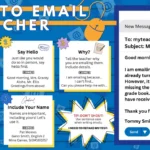
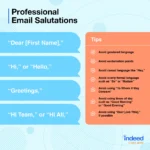
- Sign-Offs: Choose an appropriate closing statement that matches your relationship with the recipient. Common choices include:
- Best regards - Friendly yet professional
- Sincerely - Formal and traditional
- Thank you - Expresses gratitude and can foster goodwill
- Your Name: Always include your full name to ensure clarity. If the recipient may not recognize your email address, this adds a level of familiarity.
- Position and Company: Including your job title and organization lends credibility to your communication. This can also aid in quick identification of your role.
- Contact Information: Adding your phone number or alternative email address is helpful, especially if the recipient may need to reach you urgently.
- Personal Touch: A brief sentence expressing hope for their well-being or looking forward to future interactions can add warmth and human connection.
| Sign-Off | Usage Context |
|---|---|
| Best regards | General communication, semi-formal |
| Sincerely | Formal contexts, initial communications |
| Thank you | When expressing gratitude or appreciation |
| Warm regards | Friendly, but still professional |
| Cheers | Informal settings or among familiar colleagues |
Each component you include reinforces professionalism while fostering a personable connection. The right closure strengthens your communication and enhances your image in the recipient’s mind.
For those using Outlook, knowing how to delay sending an email can be another valuable skill. It allows for final reviews to perfect your message before it lands in someone’s inbox. Check out more about that process here.
Real-World Examples of Ending a Professional Email
Using a Polite Thank You
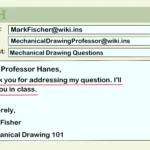
Adding a simple "Thank you for your time and consideration" can leave a positive impression. This is particularly useful in instances where you're requesting assistance or information.
Why this matters: Acknowledging others’ efforts builds rapport and encourages a favorable response.
Encouraging Further Dialogue
Including a phrase like "I look forward to your feedback" invites the recipient to engage with you, fostering a two-way conversation.
Why this matters: Motivating dialogue opens the door for clarification, ensuring that both parties are aligned on expectations.
Establishing Next Steps
Phrase such as "Let’s discuss this further in our upcoming meeting" clarifies what’s next, making it easier for the recipient to understand the flow of communication.
Why this matters: Outlining next steps creates a roadmap for follow-up, ensuring accountability and preserving momentum.
Offering Assistance
Ending with "Please let me know if I can assist you further" conveys your willingness to help and keeps the lines of communication open.
Why this matters: Displaying willingness to assist enhances teamwork and demonstrates your commitment to collaboration.
Adding a Personal Touch
Including a line like "Wishing you a productive week ahead" personalizes the email, making it feel less transactional and more genuine.
Why this matters: Personal touches foster relationships and make your correspondence memorable.
Encouraging Responses with a Question
Finishing with a question such as "What do you think about this approach?" prompts the recipient to respond and share their thoughts.
Why this matters: Asking questions promotes engagement and emphasizes the value of the recipient's opinion.
Including Your Contact Information
Ending with "Feel free to reach me at [your number]" ensures the recipient knows how to contact you, enhancing accessibility.
Why this matters: Providing contact information makes you approachable and accessible, reinforcing effective communication.
Ending Professional Emails with Confidence
What are some common phrases to end a professional email?
Common phrases include "Best regards," "Sincerely," and "Thank you." Choosing a closing that matches the tone of your email is important. If you have an established relationship, something warmer like "Warm regards" might also work.
How do I choose the right closing for my audience?
Consider your relationship with the recipient and the context of your message. For formal interactions, stick with "Sincerely" or "Respectfully." If it’s more casual, a simple "Thanks" or "Cheers" can be appropriate.
Is it necessary to include my name under the closing?
Yes, including your name is standard practice in professional emails. It adds a personal touch and ensures the recipient knows who the message is from. Including your title and contact information below your name can also be helpful.
How can I end an email that includes a request?
In that case, a polite closing like "I appreciate your help" followed by your name is suitable. This expresses gratitude and encourages a positive response. Make sure your closing aligns with the tone of your request.
Wrapping up your professional emails doesn’t have to be a chore; it’s all about leaving a positive impression without being overly formal. You want your reader to feel valued and understood, so make sure your closing reflects warmth while staying professional. Don't hesitate to encourage replies or express your enthusiasm for future conversations. So go ahead, put these tips into practice, and watch how it can elevate your email communications. And if you ever find yourself wondering about perfect timing, check out how to delay sending an email in Outlook for even better control over your message delivery!