Ever hit "send" and immediately wished you could hit "undo"? You're not alone. We’ve all been there—an email that sounded perfect in your head suddenly seems like a mistake the moment it leaves your inbox. Whether it was a misunderstood message or a deeply regretted attachment, knowing whether you can erase your digital slip-up is crucial.
In a world where emails fly faster than we can read them, understanding your options can save you from future headaches. The good news? There are ways to manage what you send, even if it takes a bit of finesse.
Essential Considerations for Email Deletion
When you send an email, it feels like it’s gone for good. However, the reality is more complex. Understanding what happens to your email and the options available for deletion is crucial.
Here’s a breakdown of the core elements involved in deleting a sent email:
- Email Provider Policies: Different providers, like Gmail or Outlook, have specific policies regarding deletion. Some might allow you to recall an email under certain conditions.
- Recall Features: Some email systems, particularly corporate ones, offer a recall function. This can retract the email if the recipient hasn’t read it yet, but it’s limited in scope and success rate.
- Sent Folder Management: Deleting the email from your "Sent" folder doesn’t remove it from the recipient's inbox. It’s just gone from your view.
- Privacy Concerns: Depending on how the recipient’s email service handles the email, it may be stored on their servers indefinitely.
- Social and Professional Implications: Consider the consequences of sending an email in haste. Miscommunication can affect relationships, and understanding this can shape your emailing habits.
Comparative Overview of Email Systems
| Email Provider | Recall Option | Deletion from Inbox | Retention Policies |
|---|---|---|---|
| Gmail | No direct recall; uses "Undo Send" within a short window | Not possible; recipient retains a copy | Retention depends on recipient's settings |
| Outlook | Yes, but only within organization and certain conditions | Not possible; remains in inbox | Can vary widely based on policies |
| Yahoo | No recall option | Not possible | Subject to their data retention policies |
| Apple Mail | No recall option | Not possible | Data retention policies apply |
Understanding these elements can empower users when dealing with unintended email sends. Comprehending your email provider’s functions and limitations simplifies the management of your communication effectively. Further explore the process of managing your inbox with articles like How to Delete Emails From Gmail In Bulk For A Clutter-Free Inbox.
Exploring the Ability to Delete Sent Emails
Recalling Emails in Outlook
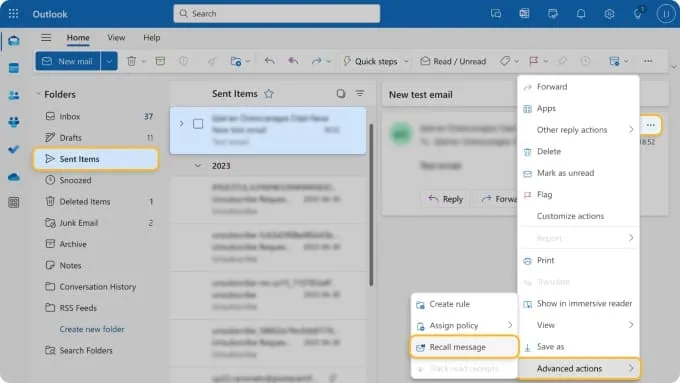
Outlook offers a "Recall" feature that allows users to retract an email after it has been sent, provided the recipient has not yet opened it. This feature is particularly useful in corporate environments where timely communication is critical.
Why this matters: Highlighting the significance of quick corrections, this feature allows users to mitigate the consequences of sending a message with errors or unintended recipients.
Gmail's Undo Send Feature
Gmail provides an "Undo Send" option that allows users to retract an email within a short window, typically five to thirty seconds after hitting 'Send.' This functionality helps prevent the frustration of immediate regret.
Why this matters: By keeping the window open for cancellation, this feature empowers users to rethink their message choices before the email becomes permanent.
Mobile Email App Retracts
Many mobile email applications offer similar features to their desktop counterparts, enabling users to retract sent emails. For instance, the iOS Mail app allows users to draft and delete sent emails quickly.
Why this matters: Stating convenience, these mobile capabilities ensure users can manage their communications effectively, even on the go.
SMTP Server Settings and Delays
Some SMTP server configurations allow for a delay in email delivery, providing users with a grace period to cancel or amend messages. This setting can be especially beneficial for large organizations needing strict oversight.
Why this matters: Providing a buffer period enhances control over email communications, protecting users from unintentional missteps.
Email Etiquette and Resending
Deleting a sent email may not always be possible, but following up with a correction is a solid practice. Users can send an additional email clarifying the mistake, thus maintaining professionalism.
Why this matters: Asking how mistakes can lead to misunderstandings, this approach fosters effective communication and helps preserve relationships.
Impact of Email Deletion on Organization Policies
Certain workplaces have policies surrounding email management, including protocols for retracting or deleting sent messages. Familiarity with these policies can help employees avoid miscommunication.
Why this matters: By keeping organizational standards in mind, employees can navigate their correspondence more thoughtfully, minimizing risks associated with misfired emails.
Third-Party Email Applications
Some third-party applications integrate with email services, offering enhanced features for recalling messages. These apps can provide users with additional layers of control over their email communications.
Why this matters: Highlighting additional functionalities, these tools enable greater flexibility for users seeking to customize their email management experience.
Understanding Email Deletion Post-Sending
Can I permanently delete an email I've already sent?
No, once an email is sent, you typically cannot delete it from the recipient's inbox. However, if you use an email service that supports recall, like Outlook, you might retract an email under certain conditions.
What happens if I delete a sent email from my inbox?
Deleting the sent email from your inbox only removes it from your view; it does not erase it from the recipient's mailbox. They will still have access to it unless they also delete it.
Is there a way to unsend an email in Gmail or Outlook?
Yes, both Gmail and Outlook offer a brief window during which you can "unsend" an email. In Gmail, you can enable the 'Undo Send' feature, while Outlook allows for recall under specific scenarios.
What if I sent sensitive information in an email?
If you've sent sensitive information, your best course of action is to immediately inform the recipient to disregard the email. In most cases, you can't enforce deletion on their end.
Accidentally hitting send can feel like a mini heart attack, but remember, most email platforms have some way to help you reclaim your peace of mind—whether it’s unsending a message or using the recall feature. Knowing these options can save you from potential embarrassment and give you a little more control over your digital communication. So, before you panic next time you click 'send,' take a deep breath and review your email settings. And if your inbox is getting cluttered, you might want to check out how to delete emails from Gmail in bulk for a clutter-free experience. You've got this, and you'll handle the next email with confidence!