Need to send a fax but your office is miles away from a machine? You're not alone. Many of us have moved on to digital solutions but still face the occasional need for a good old-fashioned fax. Sending a fax via email allows you to do this quickly and conveniently, saving you time and hassle. 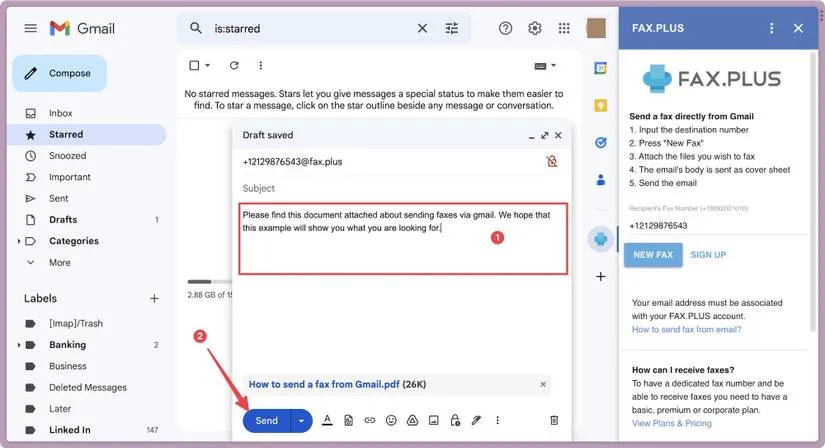
Whether it's for business documents, contracts, or sensitive information, understanding how to navigate this process can make your life a lot easier. Emailing a fax isn't just about going digital; it's also about ensuring that your important communications get where they need to go—safely and securely.
If you've ever felt overwhelmed by technology, have no fear. This is straightforward, and you'll be able to handle it without any fuss. Let's break down the steps for you, so you can feel confident in sending your documents via email.
Core Components of Sending a Fax via Email
Sending a fax via email is a straightforward process that combines digital communication with traditional fax technology. Here’s how to navigate the essential elements involved.
- Email Service: Choose an email provider that supports fax services; this can be through third-party applications or built-in features.
- Fax Number: Obtain the recipient's fax number, which is typically formatted as an email address (e.g., [email protected]).
- Document Format: Ensure the document you want to fax is in an acceptable format, commonly PDF, DOC, or TIFF. PDFs are usually preferred for maintaining formatting.
- Subject Line: Use the subject line to briefly summarize the content of your fax, providing context for the recipient.
- Attachments: Attach the documents you wish to fax. Most services allow multiple files in one fax. Check the maximum file size allowed by the service.
- Cover Sheet: You may want to include a cover sheet that contains the sender’s and recipient’s information along with any necessary notes.
- Send Confirmation: Look for an option that provides a confirmation of your fax sending. Many services send notifications confirming delivery.
Pros and Cons of Faxing via Email
| Pros | Cons |
|---|---|
| Convenience: Send documents from anywhere without needing a physical fax machine. | Cost: While many services are affordable, some may charge per fax. |
| Speed: Typically faster than traditional faxing, as documents are sent quickly via the internet. | Reliability: Possible issues with email delivery can affect receipt. |
| Accessibility: Most people have access to email, making it a widely applicable method. | Security Risks: Sensitive information may be vulnerable if not sent via a secure service. |
| Digital Documentation: Conveniently keep a digital copy of sent faxes for record-keeping. | Compatibility: Not all traditional fax machines are equipped to receive faxes from email. |
For more information on enhancing your email security while sharing sensitive documents, check out this article on sending encrypted emails in Gmail.
Real-World Applications of Sending a Fax via Email
Streamlining Medical Records Transmission
Medical facilities often need to send patient records quickly and securely. By using email to fax, healthcare providers can transmit sensitive documents to other offices or specialists without relying on traditional fax machines.
Why this matters: Highlighting the potential for faster patient care delivery can improve health outcomes and enhance communication between providers.
Facilitating Legal Document Sharing
Law firms regularly send legal documents such as contracts or court filings. Sending a fax via email allows attorneys to meet deadlines seamlessly, ensuring timely submission of important paperwork.
Why this matters: Providing timely submissions is crucial for maintaining legal integrity and client trust, particularly in fast-paced environments.
Distributing Business Proposals
Companies can send proposals to clients or partners by faxing via email, ensuring that documents are received promptly and are printed in high quality. This method is increasingly favored for its speed and convenience.
Why this matters: Stating the ability to present professional proposals quickly can enhance a company's credibility and competitive edge in negotiations.
Enhancing Operational Efficiency in Real Estate
Real estate agents frequently need to send contracts, disclosures, or offers. Using email to fax helps agents expedite transactions, sending paperwork directly from their devices without the need for physical copies.
Why this matters: Asking agents to increase their response time can lead to more opportunities and successful transactions, improving client satisfaction.
Assisting in Remote Work Situations
With more employees working remotely, sending documents via fax through email provides a practical solution for clients and workers who need to share signed agreements or other important materials without physical access to a fax machine.
Why this matters: By keeping workflows smooth despite geographic challenges, businesses can maintain productivity and effective communication logistics.
Improving Communication in Government Agencies
Government organizations often utilize faxing for correspondence, especially when handling confidential information. Using email to send faxes can enhance security and record-keeping while expediting document transmission.
Why this matters: Highlighting enhanced security measures can bolster public trust and ensure adherence to regulations relating to sensitive information.
Securing Sensitive Financial Transactions
Financial institutions require secure methods to send documents such as loan applications or account information. Sending faxes via email offers an encrypted way to send these sensitive materials, reducing the risk of data breaches.
Why this matters: Providing secure transactions fosters customer confidence, an essential element in maintaining long-term banking relationships.
Understanding How to Send a Fax via Email
What do I need to send a fax via email?
To send a fax via email, you'll need a fax service provider that supports email-to-fax functionality. Additionally, you'll require a document to fax, which can be in various formats like PDF or Word. Make sure your email account is set up and you have internet access.
Are there any costs involved in sending a fax through email?
Most email-to-fax services operate on a subscription or pay-per-use model. Some providers offer free trials or a limited number of free faxes, but substantial use usually incurs costs. It's a good idea to check the pricing structure before committing to a provider.
How do I format the email to send a fax?
Can I send multiple pages in one fax via email?
Yes, most email-to-fax services allow you to send multiple pages as a single fax. You can either attach multiple files or, if your document is in a format like PDF, include several pages within one document. Always check the specific provider's limitations on file size and number of pages.
Getting your fax sent via email doesn’t have to be a headache; it’s all about knowing the right steps and tools to use. Remember, picking a reliable online fax service can streamline the process and let you send documents with just a few clicks. So, don’t hesitate to give it a try—embracing this simple tech can save you time and make communication that much easier. If you're concerned about keeping your documents secure, check out how to send encrypted emails to bolster your privacy when sharing sensitive information. Happy faxing!