Getting bombarded with unwanted emails can feel like an endless struggle, but blocking those pesky senders on Yahoo is easier than you think. Imagine finally reclaiming your inbox and focusing on what truly matters. No one wants to sift through spam and irritating advertisements every time they check their email, and thankfully, there’s a straightforward way to put an end to it.

Blocking emails not only declutters your inbox but also protects you from potential scams and unwanted solicitations. Whether it's persistent newsletters or unsolicited messages, having control over your email experience is empowering and essential in today’s fast-paced digital world.
Core Elements of Blocking Emails on Yahoo
Blocking unwanted emails on Yahoo can greatly improve your experience by reducing spam and unwanted communications. Here’s how you can achieve that, focusing on the essential elements of the process.
Steps to Block Emails
- Log into Your Yahoo Account: Start by accessing your Yahoo Mail through any web browser or the Yahoo Mail app.
- Navigate to Settings: Click on the gear icon in the upper right corner. This will open the settings menu.
- Select More Settings: In the dropdown from the gear icon, choose "More Settings" for access to advanced email options.
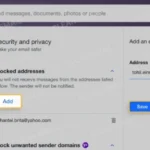
- Go to the Security and Privacy Section: Find and click on the "Security and Privacy" tab in the sidebar.
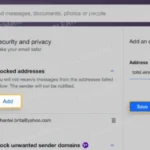
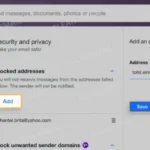
- Add Blocked Addresses: In this section, look for "Blocked Addresses" and click on “Add” to input the specific email address you wish to block. Confirm the entry.
Managing Blocked Addresses
You can revisit the blocked addresses section any time to review or delete any addresses you no longer wish to block. This allows you to maintain control over your inbox.
Benefits of Blocking Emails
- Reduced Spam: Enjoy a cleaner inbox with fewer unwanted messages cluttering your space.
- Improved Productivity: Focus on important communications without distractions from spam.
- Enhanced Security: Protect yourself from phishing attempts and malicious emails from unwanted sources.
Things to Keep in Mind
| Pros | Cons |
|---|---|
| Easy to use interface for blocking unwanted emails. | Some spam messages may still bypass the filter. |
| Ability to unblock addresses whenever necessary. | Only blocks emails from specified addresses, not domains. |
| Helps in maintaining a clean and organized inbox. | Requires manual addition of blocked addresses for new spammers. |
This straightforward process allows you to take charge of your inbox and focus on meaningful communication without the burden of unwanted emails. For users who might also be interested in managing emails across different platforms, check out how to block an email in Outlook as well.
Blocking Emails on Yahoo: Real-World Examples and Features
Utilizing Yahoo Mail’s Blocking Feature
Yahoo Mail provides a built-in feature that allows users to block email addresses directly. By accessing the settings under the "Security and Privacy" section, individuals can add specific email addresses to their block list.
Why this matters: Stating the ability to block addresses simplifies the process of managing unwanted correspondence and enhances overall user experience.
Creating Filters for Spam Control
Users can set up filters in Yahoo Mail to automatically redirect incoming emails from unwanted sources to designated folders, including the Spam folder. This setup allows for a more organized inbox.
Why this matters: Highlighting the organization of emails helps maintain focus on important messages while minimizing distractions from spam.
Reporting Spam Emails
When encountering unwanted emails, users can report them as spam with a simple click, prompting Yahoo to refine its spam detection algorithms and prevent similar messages from appearing in the future.
Why this matters: Providing feedback to Yahoo contributes to an overall decline in spam emails, benefiting all users in the community.
Using the Unsubscribe Feature
In newsletters and marketing emails, users often find an unsubscribe link at the bottom. Clicking this link can effectively stop further communications from that sender.
Why this matters: Asking for the ability to reduce unwanted subscriptions empowers users to take control of their inbox and tailor what they receive.
Maintaining a Clean Address Book
Regularly reviewing and clearing outdated or unwanted contacts from the Yahoo address book can help streamline communication, ensuring that only relevant senders remain active.
Why this matters: Emphasizing the importance of an updated address book decreases the likelihood of receiving unwanted emails from forgotten contacts.
Utilizing Yahoo Mail’s App Settings
For mobile users, Yahoo Mail offers app-specific settings that allow blocking or filtering unwanted emails. The app’s interface simplifies the process, enabling users to act on the go.
Why this matters: Providing mobile accessibility amplifies user convenience, allowing for immediate action against unwanted messages whenever necessary.
Reviewing Blocked Address Lists
Yahoo allows users to periodically review their blocked address lists within the settings. This feature enables users to adjust their blocks as needed, ensuring they only block unwanted correspondences.
Why this matters: Keeping an updated list helps optimize the blocking feature, preventing accidental blocking of legitimate communications.
Understanding Yahoo Email Blocking
How do I block a specific email address on Yahoo?
To block someone on Yahoo, start by opening an email from the sender you want to block. Click on the three dots in the upper right corner of the email and select "Block Sender." This will prevent future emails from that address from landing in your inbox.
Can I unblock someone once I’ve blocked them on Yahoo?
Absolutely! To unblock an email address, go to your Yahoo Mail settings. Click on "More Settings," then “Security and Privacy.” Here, you'll find a list of blocked addresses; simply select the one you wish to unblock and click "Remove."
What happens to blocked emails in Yahoo?
When you block an email address on Yahoo, future messages from that sender will go directly to your Spam folder. This means you won’t see them in your primary inbox at all.
Is there a limit to how many email addresses I can block on Yahoo?
Yahoo allows you to block up to 500 email addresses. Once you reach that limit, you’ll need to unblock a sender to make room for a new one.
Blocking unwanted emails on Yahoo can truly transform your inbox experience, letting you focus on what’s important without the distraction of spam and unwanted messages. It’s comforting to know that with just a few clicks, you can regain control and tailor your email interactions to your preference. So why wait? Take those simple steps today and enjoy a cleaner, more manageable inbox. You’ve got this!