Are you tired of unwanted emails cluttering your Yahoo inbox? It can be incredibly frustrating to sift through spam and promotional messages that just don’t matter to you. Knowing how to block those annoying emails is not just about having a clean inbox; it also helps you focus on the messages that really count.

Having the ability to control your inbox means less stress and more productivity. Whether it’s an incessant newsletter or persistent spam, we’ll walk you through the straightforward steps to regain control over your email experience.
When you block emails, you’re not just saving time; you’re taking back the power in a world where your attention is constantly being demanded. Let’s make your Yahoo email work for you, not against you.
Essential Elements of Blocking Emails on Yahoo
Blocking unwanted emails on Yahoo helps maintain a tidy inbox and improves your email experience. This process prevents specific senders from reaching you, offering control over your communications. Here’s how it works.
Steps to Block an Email Address
- Log into Your Yahoo Account: Open your browser and access your Yahoo email. Enter your credentials to sign in.
- Navigate to Settings: Click on the gear icon located in the upper right corner.
- Select More Settings: Click on “More Settings” from the dropdown menu.
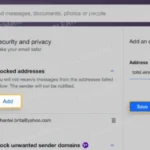
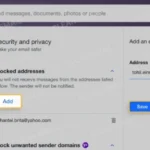
- Go to Security and Privacy: On the left side, find the “Security and Privacy” section.
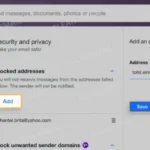
- Add an Email to Blocklist: Under “Blocked addresses,” enter the specific email address you wish to block and hit the “+” icon.
- Save Changes: Ensure you confirm the changes by navigating back to your inbox.
Benefits of Blocking Emails
- Reduces Spam: Helps eliminate persistent junk mail.
- Simplifies Organization: Keeps your inbox focused on relevant communications.
- Mood Improvement: Reduces the frustration caused by unwanted messages.
Things to Keep in Mind
- Sender Notification: Blocked senders won’t receive any notification that they are blocked.
- Unblocking Process: You have the option to unblock an email address anytime through the same settings.
- Limitations: Blocking an email doesn’t stop senders from using different addresses.
Quick Reference Table
| Action | Details |
|---|---|
| Blocking | Prevent specific senders from contacting you. |
| Unblocking | Remove an email address from your blocklist at any time. |
| Notifications | Senders are not informed when they are blocked. |
If you're also using Gmail and facing issues with blocked emails, check out how to unblock emails on Gmail to ensure seamless communication across platforms.
Practical Examples of Blocking Emails on Yahoo
Directly Blocking an Email Address
Access your Yahoo Mail account, open an email from the sender you wish to block, click on the three dots in the upper right corner, and select 'Block Sender'. Confirm the block when prompted.
Why this matters: Streamlining your inbox by stopping unwanted messages helps maintain focus on important communications.
Using Filters for Automated Blocking
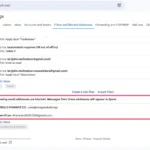
Create a filter by navigating to Settings > More Settings > Filters. Set conditions for specific email addresses or keywords to automatically move unwanted messages to the trash or spam folder.
Why this matters: Automating email management allows for a cleaner inbox and reduces the time spent on email organization.
Reporting Spam Emails
When you receive a spam email, click on it, then select the 'Report Spam' option. This action helps improve Yahoo's spam detection algorithms.
Why this matters: Contributing to spam filtering enhances the overall email experience for all users, not just yourself.
Unsubscribing from Mailing Lists
In the email, locate the 'unsubscribe' link, often found at the bottom of the message, and follow the prompts to remove your email from the mailing list.
Why this matters: Reducing clutter from unwanted newsletters significantly improves email organization and user experience.
Blocking Email Addresses on Mobile App
Open the Yahoo Mail app, find the email from the sender, tap on the three dots, and select 'Block Sender' to stop future messages from that address.
Why this matters: Managing unwanted emails on the go provides flexibility and convenience for users who rely on mobile devices.
Adjusting Spam Settings
Navigate to Settings > More Settings > Security and Privacy. Adjust your spam folder settings to ensure better handling and filtering of unwanted emails.
Why this matters: Customizing spam settings allows users to tailor their email security to fit their individual needs, enhancing trust in email communications.
Using a Temporary Email Address
For online sign-ups, consider using a disposable email address through services like Mailinator, which helps avoid spam in your primary Yahoo inbox.
Why this matters: Protecting your primary email account enhances security and reduces unwanted correspondence, promoting better email hygiene.
Understanding Email Blocking on Yahoo
How do I block unwanted emails on Yahoo Mail?
To block unwanted emails, open an email from the sender you wish to block. Click on the three dots in the top right corner and select "Block Sender." This will prevent any future messages from that address in your inbox.
What happens to blocked emails on Yahoo?
Blocked emails will not appear in your inbox. Instead, they are automatically redirected to the Spam folder, effectively keeping your inbox free from unwanted messages. Make sure to check the Spam folder occasionally to ensure legitimate emails haven’t been caught.
Can I unblock a sender on Yahoo Mail?
Absolutely. To unblock a sender, go to your Yahoo Mail settings and navigate to the "Blocked Addresses" section. From there, you can find the blocked email address and choose to unblock it, so their emails will start coming through again.
Does blocking an email sender delete old emails from them?
No, blocking a sender does not delete any existing emails in your inbox. You will still see past messages from that sender, but any new emails they send after being blocked will be filtered away.
Blocking unwanted emails on Yahoo is a straightforward way to curtail the clutter in your inbox and regain control over your email experience. By following the simple steps outlined, you can keep your inbox clean and focused on what truly matters to you. Remember, you have the power to create a more enjoyable email environment; so don’t hesitate to take that step! If you're also looking to manage your emails on other platforms, consider checking out our article on unblocking emails on Gmail for a seamless experience across different services.