Wondering how to format an email so your message stands out? You’re not alone. In a world flooded with communications, the way you present your email can dictate whether it gets read or lost in the shuffle.
Proper formatting isn’t just about aesthetics; it speaks volumes about your professionalism and respect for your reader’s time. Whether you’re reaching out to a colleague, a potential client, or your boss, a well-structured email enhances clarity and fosters better connections.
Let’s break down exactly what makes email formatting work for you, so your intentions shine through without any ambiguity. You’ll be equipped to convey your message in a straightforward manner, whether you're addressing a simple inquiry or expressing dissatisfaction with a situation.
Core Elements of Email Formatting
Formatting an email correctly is essential for clear communication. Here’s how to approach it, breaking down the core elements and their significance.
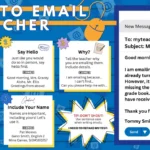
- Subject Line: This serves as the first impression. Keep it concise and relevant. It should reflect the email's main topic, encouraging the recipient to open it.
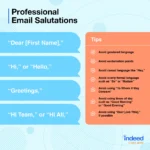
- Greeting: Address the recipient appropriately. Use their name and title as necessary. A friendly introduction fosters a positive tone and sets the mood for the rest of the email.
- Body: Structure the main content clearly:
- Introduction: Briefly state the purpose of your email. This helps the reader quickly understand the context.
- Details: Provide necessary information in a logical order. Break up large blocks of text to enhance readability. Use bullet points or numbered lists for clarity.
- Conclusion: Wrap up with any actions required from the recipient, or offer to provide further information.
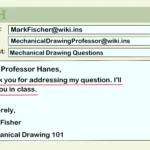
- Closing: End on a cordial note. Phrases like “Best regards” or “Sincerely” followed by your name are standard. Include your job title and contact information if applicable.
Checklist for Formatting Your Email
| Element | Considerations |
|---|---|
| Subject Line | Keep it short (5-10 words), specific, and engaging. |
| Greeting | Use a polite tone; ensure correct spelling of names. |
| Body | Organize content logically; avoid jargon; maintain a professional tone. |
| Closing | Choose a formal sign-off; include your full name and contact details. |
Following these structures not only enhances clarity but also promotes professionalism in your communications. If you're dealing with sensitive topics, such as expressing anger or frustration in emails, consider how your formatting can help convey your message without escalating tensions. Check out our article on expressing anger in an email with professionalism for additional insights.
Practical Uses for Formatting Emails
Creating a Clear Subject Line
A well-structured email always begins with an informative subject line that encapsulates the main point of your message. For instance, instead of using “Update” as a subject line, use “Project A: Status Update for October.”
Why this matters: Highlighting clarity from the outset helps recipients quickly understand the email's purpose, ensuring they prioritize it appropriately.
Using Bullet Points for Lists
When conveying multiple points or a sequence of actions, bullet points enhance readability. For example, listing action items clearly, such as:
- Finalize budget report
- Schedule team meeting
- Review project timeline
Why this matters: Simplifying complex information allows recipients to grasp key details quickly, improving the likelihood of follow-through on action items.
Maintaining a Professional Tone
Adopting a respectful and professional tone throughout the email is essential, especially in formal communications. Rather than using slang or overly casual language, opt for phrases like “I appreciate your attention to this matter.”
Why this matters: Stating professionalism fosters respect and seriousness, which can enhance your credibility and the overall effectiveness of the email.
Including a Signature Block
A robust signature block at the end of your email provides essential contact information and links, such as your name, title, company, phone number, and website. For example:
Jane Doe
Marketing Manager
XYZ Corporation
Phone: (123) 456-7890
Website: www.xyzcorporation.com
Why this matters: Providing contact details makes it easy for recipients to follow up swiftly without searching for your information, streamlining communication.
Crafting a Polite Closing
Ending your email with a courteous closing statement, such as “Thank you for your time” or “Looking forward to your response,” is vital. This helps maintain a friendly tone and encourages a reply.
Why this matters: Asking for a response invites engagement, making it more likely that recipients will reply or take the necessary action.
Formatting for Visual Appeal
Using appropriate font sizes, colors, and spacing enhances visual appeal. A clean layout with ample white space is more inviting, making your message easier to process. Avoid dense blocks of text.
Why this matters: Making emails visually appealing captures attention, encouraging recipients to read through the message rather than feeling overwhelmed.
Highlighting Important Information
Using bold or italics for key phrases helps draw attention to crucial points within your email. For instance, you might highlight a deadline or an action item by using bold text.
Why this matters: By emphasizing critical information, you guide the recipient’s focus, reducing the risk of important details being overlooked.
Understanding Email Formatting for Clear Communication
What are the essential components of a properly formatted email?
A well-structured email typically includes a clear subject line, a salutation, the body of the message, a closing statement, and a signature. The subject line should summarize the content, while the salutation sets the tone for your message. Don't forget to include a professional signature with your contact information at the end.
How can I maintain professionalism in my email formatting?
To keep your email professional, use a clean format with standard fonts like Arial or Times New Roman in a readable size, usually 10-12 points. Maintain a consistent style in your paragraphs, avoid excessive bold or italicized text, and make sure your tone throughout the email is polite and respectful.
What format should I use for the body of my email?
The body should be clear and concise. Begin with a brief introduction if necessary, followed by the main points you want to convey. Use short paragraphs or bullet points to enhance readability, and always be mindful of the overarching message you wish to convey.
How do I handle email responses and threads appropriately?
In reply emails, ensure you address the original topic or any questions raised clearly. It’s helpful to quote or summarize the key points from the previous emails for context. Additionally, avoid excessive back-and-forth; try to resolve issues in as few exchanges as possible.
As you hit that send button, remember that a well-formatted email not only conveys your message but also reflects your professionalism. Keep your writing clear and concise, use appropriate greetings and closings, and don't underestimate the importance of a polished subject line. These little details make a big difference in how your message is received. So go on, put this into action, and watch how your emails transform your communication game. You've got this!