Feeling overwhelmed by unwanted emails? You’re not alone. Blocking someone on Yahoo Mail can save you from constant distractions, allowing you to keep your inbox clutter-free and focus on what truly matters. Whether it's a persistent spammer or an old acquaintance who just won’t take the hint, knowing how to block them is a must.

Many people find themselves in situations where they need to control their communication. Ignoring unwanted messages isn't always enough, and you deserve peace of mind in your email interactions. Understanding the blocking process is straightforward and empowers you to manage your digital space effectively.
Core Elements of Blocking Someone on Yahoo Mail
Blocking someone on Yahoo Mail is a valuable feature for managing your inbox and ensuring a pleasant email experience. Below are the essential components that simplify this process.
- Accessing Yahoo Mail: Log into your Yahoo Mail account using a desktop browser or mobile app.
- Identifying the Sender: Locate an email from the person you wish to block.
- Blocking the Sender: Within the email, find the options menu (usually represented by three dots or the gear icon). Click on it to unveil the block option.
- Confirmation: Confirm your action when prompted to ensure that the sender is blocked successfully.
- Managing Blocked Addresses: Access blocked addresses through the settings to review or unblock contacts at any time.
Checklist for Blocking Emails
| Step | Details |
|---|---|
| 1 | Log In |
| 2 | Open Email |
| 3 | Click Options Menu |
| 4 | Select Block Sender |
| 5 | Confirm Action |
| 6 | Check Blocked List in Settings |
Pros and Cons of Blocking Users
While blocking someone can be quite straightforward, it's helpful to understand the potential benefits and drawbacks.
- Pros:
- Eliminates unwanted emails, reducing clutter.
- Enhances user experience by filtering out annoying spam or harassment.
- Offers peace of mind, knowing that unwanted contacts cannot reach you.
- Cons:
- Blocked senders might use different emails to reach out.
- Missed messages if legitimate contacts are mistakenly blocked.
- Requires ongoing management to maintain the blocked list.
For more information on managing your email settings, refer to the article on unblocking emails on Gmail.
Practical Ways to Block Someone from Yahoo Email
Using the Block Sender Feature
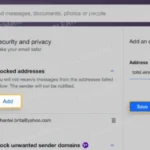
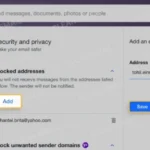
Access your Yahoo Mail, navigate to the Settings menu, and select the "More Settings" option. From there, go to "Security and Privacy" and add the email address you wish to block under the “Blocked Addresses” section.
Why this matters: Stating that this method allows you to prevent unwanted emails from specific senders keeps your inbox organized and free from spam.
Creating a Filter for Specific Emails
In Yahoo Mail, create a filter to automatically send emails from a specific sender to your Trash or Spam folder. This can be done through the "Filters" section in the Settings menu.
Why this matters: Highlighting the benefit of this feature enhances your control over incoming messages, enabling a more tailored email experience.
Reporting Spam Emails
Mark unwanted emails as spam by selecting the email and clicking the "Spam" button. This action not only blocks the sender but also trains Yahoo's algorithms to filter similar emails in the future.
Why this matters: Providing a proactive approach to handling unsolicited emails helps maintain a clean inbox and improves overall email functionality.
Using a Temporary Email Address
If repeated unwanted emails occur, consider using a temporary or disposable email address for online sign-ups. This reduces the chances of receiving spam in your main Yahoo account.
Why this matters: Asking people to consider this approach promotes privacy and helps users maintain control over their main email communications.
Subscription Management
Check if you signed up for newsletters or services that lead to unwanted emails. You can unsubscribe from these directly via the email footer linked to your Yahoo account.
Why this matters: By managing subscriptions, you decrease clutter in your inbox, making it easier to find important communications.
Changing Your Yahoo Privacy Settings
Adjust privacy settings in Yahoo Mail to limit who can reach you. This includes changing preferences for who can send you emails.
Why this matters: Suggesting increased privacy settings highlights the importance of protecting your email from unwanted contacts.
Educating Yourself on Phishing Scams
Stay informed about phishing scams that often masquerade as legitimate emails. Familiarize yourself with the common signs of phishing, such as suspicious links or urgent calls to action.
Why this matters: Emphasizing the need for awareness helps users avoid falling victim to scams, protecting their personal information.
Understanding How to Block Someone on Yahoo Email
How do I block a specific email address on Yahoo Mail?
To block an email address, log into your Yahoo Mail account, open an email from the sender you wish to block, and click on the three dots in the upper right corner of the email. Select “Block Sender” from the dropdown menu, and confirm the action. This will prevent future emails from that address from reaching your inbox.
Will blocking someone on Yahoo Email delete our previous messages?
No, blocking someone does not delete the previous messages you have exchanged with that sender. All past communications will remain in your inbox or folder unless you manually delete them. Blocking only stops future emails from arriving.
Can I unblock someone after blocking them on Yahoo Mail?
Yes, you can unblock someone any time. Go to your Yahoo Mail account settings, click on “More Settings,” and then navigate to “Security and Privacy.” From there, you can find the list of blocked email addresses and choose to unblock any that you wish to receive emails from again.
What happens if someone I blocked tries to send me an email?
If a blocked sender attempts to email you, their messages will not appear in your inbox. Instead, the emails are automatically routed to your spam folder, or filtered out entirely, depending on your settings. You'll receive no notification or indication of their attempt to contact you.
Blocking someone on Yahoo email can really help make your inbox a more pleasant space to manage. Remember, it’s all about ensuring your online environment feels safe and stress-free. Now that you know how to take that step, don’t hesitate to act on it if you need to. It’s your email, and you deserve to enjoy it without unnecessary interruptions. If you ever find yourself needing to reset connections, check out how to unblock emails on Gmail for another helpful perspective. Take charge of your digital space, and happy emailing!