Need to scan and email documents quickly? You’re not alone—everyone from busy professionals to students often faces this task. Whether it's sending a signed contract or sharing class notes, knowing where to scan documents efficiently makes life simpler.

Let’s explore some practical options that can fit right into your routine. You don’t need to be tech-savvy; it’s about finding the right tools and locations to get the job done.
From local print shops to apps on your phone, there’s a whole world of scanning solutions waiting for you. Remember, the goal is to make the process seamless so you can focus on what really matters.
Core Concepts for Document Scanning and Emailing
Scanning documents and emailing them is a routine need in both personal and professional settings. Understanding the right tools and methods can streamline this process significantly.
Methods for Scanning Documents
- Scanner: Dedicated document scanners offer high quality and speed. They can handle multiple pages and often include features for automatic document feeding.
- Multi-Function Printers (MFPs): These machines combine printing and scanning capabilities, making them versatile for office use.
- Mobile Apps: Smartphone apps like Google Drive or CamScanner allow you to use your phone's camera to scan documents. This option is convenient for quick scans on the go.
- Photocopy Machines: In many offices, photocopiers come equipped with scanning capabilities, allowing you to save documents directly to email or USB drives.
Document Formats
Choosing the right format for your scanned documents impacts accessibility and usability. Common formats include:
- PDF: Ideal for preserving formatting and is widely accepted for business documents.
- JPG: Good for images but may not retain text quality as well as PDFs.
- TIFF: Best for archiving purposes, especially for high-resolution images.
Emailing Scanned Documents
Once scanned, documents can be easily emailed. Here’s how:
- Save the scanned document on your device.
- Open your email application.
- Compose a new email and attach the scanned document.
- Send it to the intended recipient.
Things to Consider When Scanning and Emailing
| Consideration | Description |
|---|---|
| File Size | Large files may exceed email limits. Compress documents if necessary. |
| Security | Ensure sensitive documents are appropriately secured and consider encryption for email transmission. |
| Resolution | Set a suitable DPI (dots per inch) to balance clarity and file size. Usually, 300 DPI works well for text documents. |
For those looking for more detailed steps and methods, check out How Do You Scan A Document To Email For Easy Sharing.
Practical Ways to Scan Documents and Email Them
Using Mobile Scanning Apps
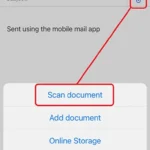
Scanning documents on-the-go is made simple with mobile apps like Adobe Scan and CamScanner. Users can capture images of physical documents and convert them into PDFs directly from their smartphones, then email those files instantly.
Why this matters: Highlighting convenience, these apps allow for document management anywhere, enabling quick sharing and reducing the need for physical copies.
Employing Multifunction Printers
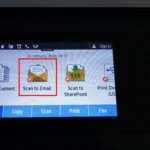
Multifunction printers, available in many offices, can scan documents directly to email addresses. Simply place the document in the scanner, select the email option, and input the recipient's address to send it instantly.
Why this matters: Providing a streamlined process, this feature saves time and resources by merging printing and scanning tasks into a single device.
Utilizing Community Resources
Local libraries and community centers often offer public scanning services. Patrons can visit these locations to scan documents and email them for free or for a nominal fee.
Why this matters: Encouraging community engagement, these resources make document scanning accessible to those without personal equipment, fostering inclusivity.
Integrating Cloud Services
Using cloud storage solutions like Google Drive facilitates document scanning and emailing. Users can scan documents to their cloud account and share the links via email, retaining control over file access.
Why this matters: Stating flexibility, this integration allows users to manage documents securely while enabling easy sharing with multiple recipients.
Adopting Document Management Systems
Companies often implement document management systems that include scanning capabilities. Employees can scan documents and route them to relevant team members or departments through the system's emailing feature.
Why this matters: By enhancing collaboration, these systems streamline workflow and ensure everyone has access to essential documents without physical handling.
Implementing Kiosks in Offices
Some workplaces use self-service kiosks equipped with scanning capabilities. Employees can scan documents and send them via email directly from the kiosk interface, often without needing IT assistance.
Why this matters: Providing self-sufficiency, these kiosks reduce the burden on office staff and enhance operational efficiency.
Connecting to Email Clients via Scanners
Certain standalone scanners allow users to set up email accounts directly on the device. After scanning a document, users can send it via their configured email accounts without a computer.
Why this matters: Asking for simplicity, this feature minimizes the steps required to email a scanned document, enhancing user experience and productivity.
Finding Places for Document Scanning and Emailing
Where can I find local businesses that offer scanning services?
You can check local office supply stores, libraries, and print shops. Many of these establishments provide self-service scanning stations or staff assistance to help you scan and send documents via email.
What should I look for in a document scanning service?
When choosing a service, look for speed, quality, and the ability to handle different document sizes. It’s also helpful if they offer email capabilities directly from their machines.
Can I scan documents using my smartphone?
Yes, there are many apps available that allow you to scan documents using your phone's camera. Most of these apps also let you email the scanned documents right from your device, making it quite convenient.
What if I need to scan sensitive documents?
For sensitive documents, it’s best to use a secure scanning service or a private machine. Ensure the location has good reviews regarding privacy and document handling to protect your information.
Finding a place to scan and email your documents doesn’t have to be a hassle. Whether it’s a local library, office supply store, or a cozy coffee shop, you’ve got options that can fit right into your daily routine. Keep in mind, though, that knowing how to scan those documents efficiently is just as important as where you do it. If you need a little help on the scanning process itself, check out our article on how to scan a document to email for easy sharing. So, gather those papers, grab your phone or laptop, and make that scan happen. You’ve got this!