Ever hit 'send' on an email and immediately regretted it? You're definitely not alone. The ability to recall an email can feel like a safety net, offering a glimpse of control in our fast-paced digital lives. 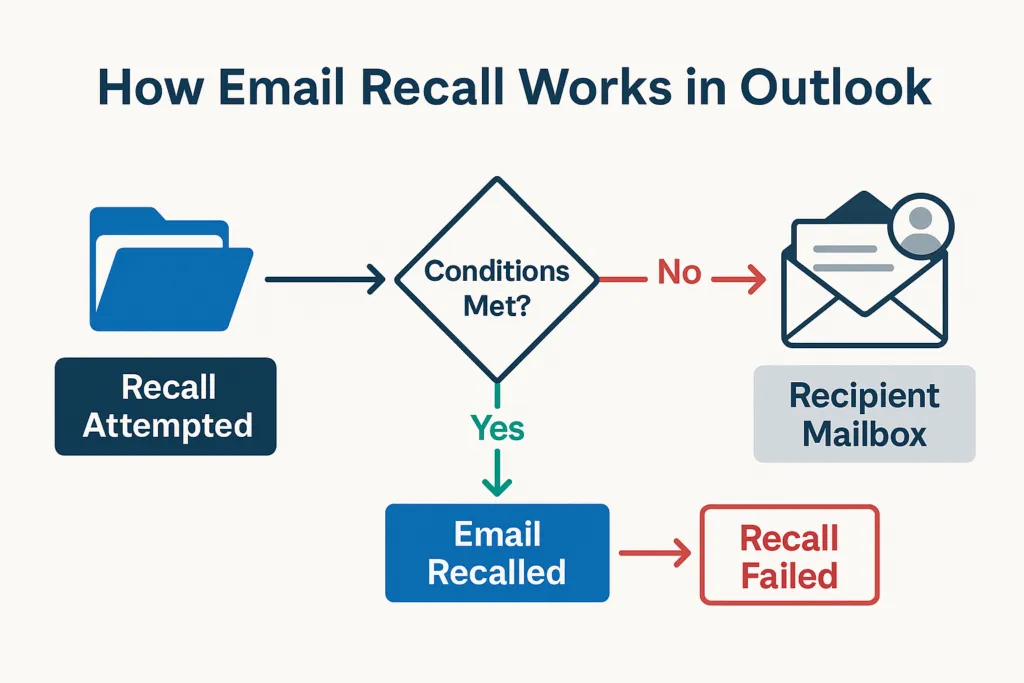
Understanding what it really means to recall an email is crucial, especially if you rely heavily on platforms like Outlook. When mistakes happen, knowing how to act can save you from potential misunderstandings or embarrassing moments.
If you're wondering what the process entails or how it works, you’re in the right place. It’s more than just hitting a button; it's about timing, technical limits, and the recipient's actions. Let’s break it down so you can handle those ‘oops’ moments with confidence.
Core Elements of Email Recall
Recalling an email involves attempting to retract or remove a sent message before the recipient can read it. This process can be crucial in scenarios where a mistake has been made, such as sending sensitive information or making typographical errors.
Here’s a closer look at the main components of recalling an email:
- Platform Limitations: The ability to recall an email is often platform-dependent. For example, Microsoft Outlook offers this feature, but it’s not universally available in other email services like Gmail.
- Recipient Conditions: The success of an email recall largely relies on the recipient’s email settings. If they’ve already opened the email or if they’re using a different email client, the recall may fail.
- Timing: Quick action is essential. The sooner you try to recall the message after sending it, the better your chances of success.
- Notification: In many cases, the recipient may receive a notification about a recall attempt. This could draw attention to the original email, potentially causing more issues than it solves.
Pros and Cons of Email Recall
Understanding both the advantages and disadvantages is crucial for making informed decisions about recalling emails.
| Pros | Cons |
|---|---|
| Can correct mistakes quickly. | Success is not guaranteed; numerous factors affect it. |
| Reduces the potential for misunderstandings. | Recipients may receive notifications about the recall attempt. |
| Can prevent the sharing of sensitive information. | Some platforms do not support this feature, limiting availability. |
Take note of these points, especially if you're considering recalling an email to rectify a mistake. Understanding the mechanics can help you navigate the potential pitfalls more smoothly.
For example, if you want to perform a recall in Outlook, you can explore steps to do this effectively in our article on unsending emails in Outlook.
Understanding Email Recall: Real-World Examples and Use Cases
Rectifying Mistakes in Official Correspondence
When an employee accidentally sends an email with incorrect financial figures to a client, recalling the email allows them to send a corrected version without the client seeing the initial error.
Why this matters: Highlighting the importance of accuracy, recalling an email can uphold a company’s professionalism and avoid potential miscommunication.
Changing Meeting Details Instantly
A project manager sends out a meeting invite with the wrong date. By recalling the initial email, they ensure that attendees only see the updated invitation with the correct details.
Why this matters: Stating the need for clarity, recalling allows stakeholders to stay on the same page, preventing missed appointments and confusion.
Protecting Sensitive Information
If a team member accidentally sends an email containing confidential information to the wrong recipient, recalling it can help minimize information leakage and maintain security protocols.
Why this matters: Providing a safety net, recalling emails mitigates the risk of exposing sensitive data and maintains trust with clients and colleagues.
Responding to Client Feedback
A customer service representative sends a response that misinterprets a customer’s complaint. By recalling the email, they can send a clearer, more accurate response that addresses the customer's concerns directly.
Why this matters: Asking for improvement in communication demonstrates a commitment to customer satisfaction and strengthened relationships.
Adjusting Project Updates
During a project update, a team leader realizes they've shared outdated information. Recalling the email allows them to send an update that reflects the latest project developments.
Why this matters: By keeping team members informed, recalling ensures that everyone works with the most current information, fostering collaboration and productivity.
Ensuring Clarity in Legal Communications
An attorney mistakenly sends an email containing legal advice that isn’t applicable to a client’s case. By recalling the message, they can revise it to align accurately with the client’s specific situation.
Why this matters: Stating the significance of precision in legal matters underscores the necessity of precise communication to avoid potential liabilities.
Avoiding Unintended Humor
An employee forwards a humorous email intended for friends but accidentally sends it to a work group. Recalling it helps to prevent possible misunderstandings and maintains professional decorum.
Why this matters: Highlighting professional etiquette, recalling such emails safeguards workplace relationships and reinforces the importance of appropriate communication.
Understanding Email Recall: Common Questions Answered
What does it mean to recall an email?
Recalling an email means attempting to retract or remove a sent message from the recipient's inbox. This function is typically available in email clients like Microsoft Outlook, allowing users to prevent the recipient from reading the email or to send a corrected version instead.
Can you always successfully recall an email?
No, a successful recall is not guaranteed. It depends on several factors, including the recipient's email settings, whether the email has already been read, and if both accounts are hosted on the same email server.
What happens if the recall is unsuccessful?
If the recall fails, the recipient retains full access to the original email. They may also receive a notification about the failed recall attempt, which can lead to misunderstandings or confusion.
Is recalling an email a secure option for sensitive information?
Recalling an email is not a foolproof method for managing sensitive information. If the recipient has already opened the email or forwarded it, you have no control over its dissemination, making it a risky option for confidential content.
Recalling an email can feel like a safety net, but it’s not foolproof—it's more about quickly addressing a mistake before it spirals. Knowing the limitations and conditions of your email platform can save you from some awkward moments down the line. So, the next time you hit send too soon or realize you forgot something important, remember to double-check your settings and act fast. And if you're using Outlook, definitely check out our article on how to unsend an email for those moments when you just need a little extra reassurance. You've got this!