
Need to sign a document you received via email but unsure how? You’re not alone. In an age where most transactions happen online, knowing how to sign an emailed document is a must-have skill. Whether for a work contract, an agreement with a friend, or important forms, getting it right helps maintain professionalism and saves you time.
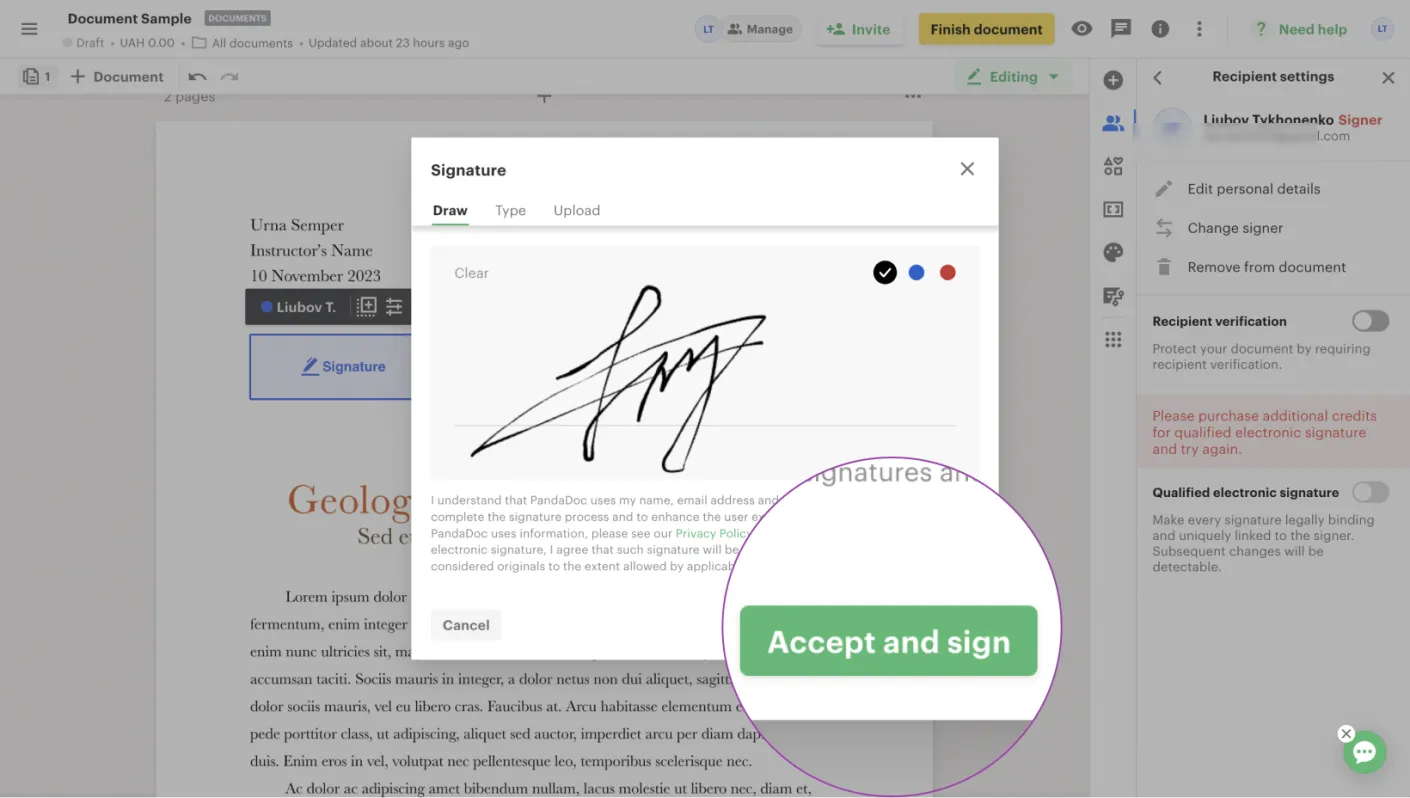
First, think about why this matters. If you’re constantly emailing documents, a seamless signing process can save you from frustration and delays. It’s not just about convenience; it’s about ensuring you stay organized and efficient, whether you’re at home or on the go.
This process might seem daunting, but there are straightforward methods available. Let’s break it down into manageable steps so you can confidently sign your emails and keep everything moving smoothly.
Core Elements of Signing an Emailed Document
Signing an emailed document can feel daunting, but breaking it down into straightforward steps makes it manageable. Here's what you need to know.
- Format of the Document: Ensure the document is in a widely recognized format, typically PDF or Word, which makes signing accessible for recipients.
- Digital Signatures: Utilize digital signature services such as DocuSign or Adobe Sign. These platforms secure your signature with encryption, providing authenticity.
- E-Signature Tools: Most e-signing platforms allow you to draw your signature or use a pre-defined font that resembles a handwritten signature.
- Legal Considerations: Familiarize yourself with the laws regarding electronic signatures in your country or state, ensuring compliance with regulations like the ESIGN Act in the U.S. or eIDAS in Europe.
- Authentication: Verify your identity if prompted, which might involve entering a one-time code sent via SMS or email.
Step-by-Step Process
| Step | Description |
|---|---|
| 1 | Open the Document: Start by downloading the document you need to sign. |
| 2 | Choose Signing Method: Decide whether to sign digitally using a platform or print the document to sign manually. |
| 3 | Insert Your Signature: If using an e-signature tool, follow the prompts to place your signature in the designated area. |
| 4 | Save and Send: Save the signed document and send it back via email, ensuring the file is in an appropriate format. |
For additional insights on professional email communication, check out the article on how to sign an email for professional communication.
Practical Uses for Signing Emailed Documents
Digital Contracts in Business Transactions
Signing a digital contract can streamline the process of entering agreements without the need for printing and scanning. A business can send a contract via email, allowing the other party to sign digitally using platforms like DocuSign or Adobe Sign.
Why this matters: Enhancing the speed of transactions reduces bottlenecks and improves operational efficiency.
Real Estate Lease Agreements
When leasing a property, landlords can email lease agreements to potential tenants who can sign and return them digitally, eliminating the hassle of in-person meetings.
Why this matters: Simplifying the leasing process makes it easier for both parties to finalize agreements quickly, fostering better relationships.
Remote Employee Onboarding
Hiring managers can send onboarding documents, such as offer letters and tax forms, via email for new hires to sign digitally prior to their start date.
Why this matters: Streamlining onboarding procedures helps new employees feel welcomed and engaged from day one.
Legal Document Signing
Lawyers often send various legal documents, such as affidavits or settlement agreements, that clients can sign electronically, ensuring compliance and maintaining legal validity.
Why this matters: Protecting legal integrity while making the signing process more accessible is crucial for client satisfaction.
Healthcare Consent Forms
Healthcare providers can email consent forms for surgery or treatment that patients can sign digitally, facilitating quicker consent collection.
Why this matters: Improving patient care efficiency ensures crucial treatment timelines are met without unnecessary delays.
Academic Document Verification
Educational institutions can email transcripts or diplomas for students to sign off on, which are then used for job applications or further education.
Why this matters: Validating academic documents quickly aids students in applying for opportunities without added administrative burdens.
Non-Disclosure Agreements (NDAs)
Companies often send NDAs to employees and contractors via email, allowing them to sign and return documents swiftly to protect sensitive information.
Why this matters: Securing business information and intellectual property becomes more efficient, fostering trust and encouraging collaboration.
Understanding E-Signature Methods for Emailed Documents
What are the most common ways to sign an emailed document?
Many people use e-signature services like DocuSign or Adobe Sign, which allow users to sign documents digitally. Alternatively, you can use software that offers handwritten signatures via a touchpad or sign directly on a PDF using tools like Adobe Acrobat.
Is it legally binding to sign a document online?
Yes, digitally signed documents are generally considered legally binding, provided they comply with laws such as the ESIGN Act in the U.S. and eIDAS in the EU. Always check the specific requirements in your jurisdiction to ensure validity.
Can I sign a document without printing it out?
Absolutely! Digital signature platforms eliminate the need for printing. You can sign documents electronically using your mouse, stylus, or finger on a touch-enabled device, making the process quick and environmentally friendly.
What should I do if I can't access digital signature tools?
If you lack digital signature tools, consider converting the document to a PDF, then use markup tools or a PDF reader that allows you to add your signature manually. Alternatively, you can request a printed version to sign and scan back if necessary.
Signing an emailed document is all about making your life easier while keeping things professional. When you use electronic signatures, you're not just saving time; you're also streamlining your processes and ensuring that the paperwork flows smoothly. So whether you’re sealing a business deal or signing off on a personal matter, taking the leap into the digital signature world will simplify things for you. Go ahead and give it a try; you might wonder how you ever managed without it! If you're keen on enhancing your email communication skills, check out our piece on signing emails for a polished touch.




