Thinking about changing your iCloud email? You’re not alone. It can be a hassle when your current address no longer fits your needs, whether due to privacy concerns or a desire for something new.
In a world where our digital identities feel increasingly important, understanding how to make this change can help you maintain better control over your online presence. This isn’t just about a different email address; it’s about ensuring your communications reflect who you are today.
Core Elements of Changing Your iCloud Email
If you’re looking to change your iCloud email address, it’s important to understand the process and implications. Apple tightly integrates iCloud services with your Apple ID, so a few essential aspects come into play.
- iCloud Email Address Type: You can’t change your existing iCloud email address if it ends with “@icloud.com.” What you can do is create a new Apple ID with a different email address that you prefer.
- Adding Aliases: Instead of changing the main email, consider creating an alias. This allows you to send and receive emails from different addresses without needing to change the underlying iCloud account.
- Data Migration: Ensure you back up your data. Changing your iCloud email could affect access to documents, photos, and other data linked to your current Apple ID.
- Account Security: Always update your security settings whenever you change your email. This includes modifying recovery contacts and two-factor authentication settings.
- App and Service Recommendations: Certain apps and services may be tied to your existing Apple ID. Make a list to check which need updating after the change.
Checklist for Changing Your Email on iCloud
| Step | Description |
|---|---|
| 1. Decide on a New Email | Select the email address you want to use, ensuring it is not already associated with another Apple ID. |
| 2. Create a New Apple ID | Visit the Apple ID website to create a new account. Enter your preferred email and follow the on-screen instructions. |
| 3. Migrate Data | Transfer data from your old iCloud account to your new Apple ID. You may need to manually move files from iCloud Drive and re-sync your devices. |
| 4. Update Apps | Log into any apps or services using your new Apple ID. This might include email apps and app store purchases. |
| 5. Confirm Security Settings | Double-check that security features (like two-factor authentication) are updated for your new email address. |
Consider the pros and cons of changing your iCloud email. While it might provide a fresh start, it often comes with migration headaches and the risk of losing access to data and services. Always weigh these factors carefully before making any changes.
For additional information on managing emails, check out our article on printing emails from Outlook.
Practical Use Cases for Changing Your iCloud Email
Recovering Access to Your Account
Changing your iCloud email can be essential if you can no longer access your original email account. By updating it to a new email address, you can regain access to your iCloud account and associated data without losing important information.
Why this matters: Highlighting the importance of account security, having access to your iCloud account allows you to keep your data intact and protected.
Personal Branding and Professional Image
If you're shifting careers or moving toward a more professional image, altering your iCloud email to reflect your name or business can enhance your personal branding and create a more polished impression.
Why this matters: Stating how a professional email address can influence first impressions helps in building trust and credibility with clients and colleagues.
Improving Communication Clarity
Switching to an email address that is easier to remember can streamline communication, making it simpler for others to reach you without confusion. This is particularly useful for networking purposes.
Why this matters: Providing clarity in communication allows you to foster connections and relationships more easily, which can lead to future opportunities.
Separation of Personal and Work Life
Using a dedicated iCloud email for work-related tasks can help differentiate your personal and professional life, reducing the risk of overlooking important emails from either domain.
Why this matters: By keeping your work and personal emails separate, you can increase organization and efficiency in managing your time and responsibilities.
Updating for Privacy Concerns
If your email address has been compromised or shared widely, changing it can enhance your privacy and reduce unwanted solicitations or spam.
Why this matters: Stating how privacy is increasingly crucial in the digital age emphasizes the need to protect personal data from unauthorized access.
Aligning with Family or Shared Accounts
For families using shared Apple features or devices, choosing a unified email address can simplify account management and make it easier to share purchases, subscriptions, or iCloud storage.
Why this matters: By keeping everyone aligned under a common email, you create a smoother family experience using technology together, fostering better collaboration.
Facilitating Subscription Management
Changing your iCloud email can also be beneficial for managing various subscriptions tied to your old email, consolidating notifications to a new address to ensure you stay updated on important information.
Why this matters: Highlighting the need for streamlined subscription management allows you to reduce chaos in your inbox, leading to improved organization.
Understanding Your iCloud Email Changes
Can I change my iCloud email address to a different one entirely?
No, you can't simply change your iCloud email address to a different email domain. You can create a new iCloud account with a different email, but you'll need to decide if you want to keep your current account or start fresh.
What happens to my data if I create a new iCloud email?
Creating a new iCloud email means your existing data, like contacts, photos, and documents tied to the old account won’t transfer automatically. You’d need to manually migrate your data to the new account if you want to preserve it.
Is it possible to change the email connected to my iCloud account without losing data?
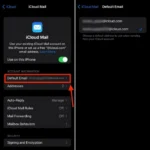
You can change the rescue email address or alternate email linked to your account, but not the primary iCloud email itself. Always make sure to back up important data before making any changes to your account settings.
Can I change my iCloud email from my iPhone or only on a computer?
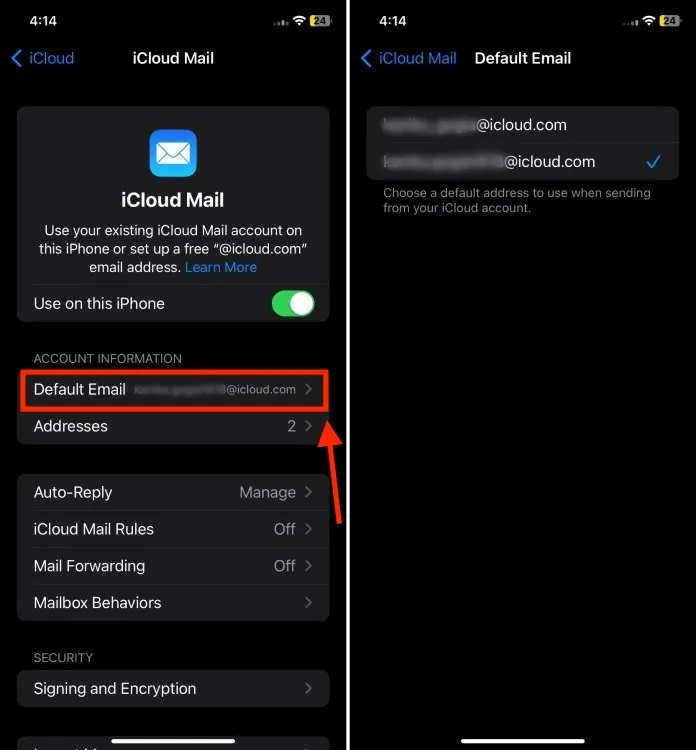
You can make changes to your iCloud settings from both your iPhone and a computer. Just go to Settings on your iPhone or log in to iCloud.com on a browser to manage your account preferences.
Changing your iCloud email is definitely doable, and knowing that you're not stuck with your original choice can be a relief. Just remember, while the process might seem a bit daunting at first, you're simply updating your account to better fit your needs. If you're ready to take the plunge, follow through on the steps, and don’t hesitate to reach out to Apple Support if anything feels off. Your digital identity should reflect who you are, so go ahead and make that change — you’ve got this!