
Signing out of your Yahoo email account might seem like a small task, but it’s an important one, especially if you’re using a shared device or want to keep your information secure. Many users overlook this step, not realizing it could lead to their emails being accessed by others. It’s essential to protect your privacy, and knowing how to sign out properly is the first line of defense.
Whether you’re stepping away from a public computer or just wrapping up for the day, understanding the sign-out process can save you from potential headaches later. Let’s break down how you can do this quickly and easily, ensuring your email stays secure.
Core Elements of Signing Out from Yahoo Email
Signing out of your Yahoo email account is a straightforward process that is important for maintaining your privacy and security. Here's a breakdown of the steps involved, along with essential details you should keep in mind.
- Access Your Inbox: Start by logging into your Yahoo email account. Ensure you're on the main inbox page to see all features clearly.
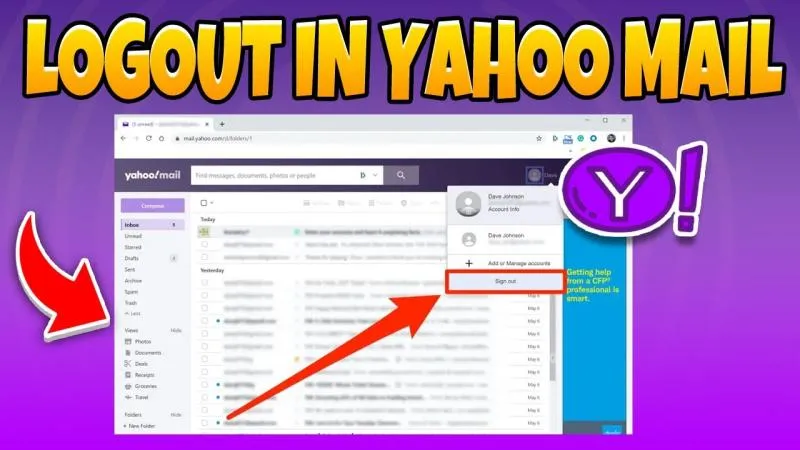
- Locate the Profile Icon: In the upper right corner of the screen, find your profile icon or your initials if you haven’t set a profile picture.
- Sign Out Option: Click on the profile icon. A dropdown menu will appear with several options. Look for the "Sign out" option, typically located at the bottom of this menu.
- Confirmation: Once you click "Sign out," you may be taken back to the Yahoo login page. Ensure that your session has been terminated by trying to access your inbox again—it should prompt you to log in.
| Action | Expected Outcome |
|---|---|
| Access your inbox | View all emails |
| Click on profile icon | Open dropdown menu |
| Select "Sign out" | Log out and return to login page |
| Attempt to access inbox again | Prompt to log in |
Additional Considerations: If you share your device with others or use a public computer, make it a habit to sign out after each session. This prevents unauthorized access to your personal information. Also, keep in mind that if you’re signed in on multiple devices, logging out of one does not affect the others unless you choose to do so manually.
For further understanding of professional communication via email, check out this article on how to sign an email for professional communication.
Real-World Applications of Signing Out of Yahoo Email
Enhancing Security When Using Public Wi-Fi
Signing out of Yahoo email after accessing it on public Wi-Fi protects your account from unauthorized access. Many public networks lack security, making it easier for potential hackers to gain entry to your email.
Why this matters: Highlighting the importance of security helps ensure users are aware of potential risks and take preventive measures.
Preventing Accidental Email Sends
By signing out from Yahoo email on shared or family computers, you eliminate the risk of someone else accidentally sending emails from your account. This gives you control over your communications and privacy.
Why this matters: Stating the relevance of personal privacy emphasizes the need to maintain control over one's digital communications.
Improving Account Management
Logging out of Yahoo email after use helps you manage multiple accounts more effectively, especially when switching between different email providers. This practice minimizes confusion and helps avoid accidental log-ins.
Why this matters: Providing clarity helps users streamline their email handling, making it easier to stay organized across multiple services.
Minimizing the Risk of Account Breaches
Ensuring you sign out of your Yahoo email when done reduces the chance of your account being breached. Regularly logging out after each session adds an additional layer of security against potential threats.
Why this matters: By keeping users informed about the risks associated with remaining logged in, you empower them to take proactive security measures.
Facilitating a Quick Transition to Another User
Logging out enables a seamless transition when multiple users share a device. This simple act eliminates confusion and maintains the privacy of each user’s email account.
Why this matters: Asking users to consider shared device etiquette underscores the importance of digital privacy in communal spaces.
Streamlining Device Performance
Signing out of Yahoo email can help improve device performance by freeing up resources. When apps and browsers are not overloaded with active sessions, devices tend to run more smoothly.
Why this matters: Providing insights on device efficiency encourages users to think about how their actions affect overall performance.
Maintaining Consistency Across Devices
Regularly signing out of Yahoo email on one device ensures that you remain logged out on others, thereby supporting consistent security practices. This is particularly useful when syncing accounts across multiple platforms.
Why this matters: Highlighting consistency reinforces the idea that managing digital accounts is an ongoing commitment to security.
Understanding Yahoo Email Sign-Out Process
How do I sign out of my Yahoo email on a computer?
To sign out of Yahoo email on a computer, click on your profile name or picture in the top right corner of the screen. A drop-down menu will appear; simply select "Sign out." You'll be logged out immediately.
Can I sign out of Yahoo email from the mobile app?
Yes, to sign out of the Yahoo email mobile app, tap on the menu icon, usually represented by three horizontal lines. Scroll down and select “Manage accounts,” then choose the account you want to sign out of, and tap “Sign out.”
What if I forgot to sign out of Yahoo email on a shared device?
If you've forgotten to sign out on a shared device, it's best to change your password immediately. This will log you out from all devices, ensuring your account remains secure. Also, consider enabling two-step verification for added security.
Is there a way to prevent having to sign out repeatedly on Yahoo email?
To avoid signing out of Yahoo email repeatedly, make sure to check the option "Stay signed in" when logging in. This keeps you logged in on that device unless you manually sign out or clear your browser's cache.
Signing out of your Yahoo email is a straightforward task, and knowing how to do it can help keep your account secure. Remember, whether you're on a shared device or just taking a break, logging out ensures that your personal information stays protected. So, the next time you finish your email session, take a second to hit that sign-out button. It’s a small step that makes a big difference in safeguarding your privacy. Happy emailing!




