Searching for that elusive old email can feel like hunting for a needle in a haystack. You know it’s out there, but how do you find it? Whether it's a forgotten receipt, an important work correspondence, or a personal note that means a lot, tracking down those lost gems can save you time and stress. 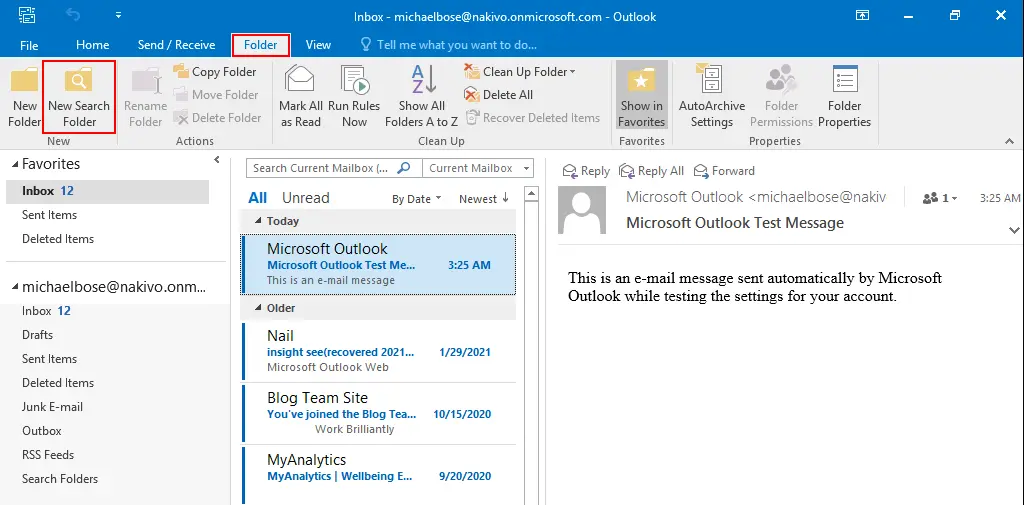
We’ve all been there—scrolling endlessly through our inbox, feeling more frustrated by the minute. Knowing how to sift through cluttered folders or leverage the right search functions can make all the difference, unlocking valuable information that you thought was lost forever. And while the thought of digging through countless threads may seem daunting, getting organized is within your reach, and it’s more straightforward than it appears.
If you use Gmail and are struggling to pin down archived emails, there are simple ways to streamline that search. Understanding where your old messages go and how to retrieve them can significantly enhance your email experience, giving you back control over your digital communications.
Core Elements of Locating Old Emails
Finding old emails can feel daunting, but understanding the system and using a few straightforward methods can simplify the process. Here’s how various components come together to help you pinpoint those elusive messages.
1. Search Functionality
Most email providers come with a robust search feature. This allows you to filter emails by:
- Sender: Use the email address or name of the person you’re trying to find.
- Date Range: Specify dates to narrow down your search.
- Keywords: Use specific words or phrases contained within the emails.
- Attachments: Filter for emails that include attachments.
2. Folders and Labels
Organizing emails into folders or applying labels can immensely aid in locating old messages.
- Archive: Emails can be archived rather than deleted, making them accessible without cluttering the inbox.
- Custom Folders: Consider creating folders for different topics or projects to simplify future searches.
3. Email Provider Features
Different email platforms offer unique features to assist you in your quest:
- Gmail: Check the "All Mail" folder for archived and hidden emails. Learn more at this resource.
- Outlook: Use "Focused Inbox" and "Other" tabs to locate mislaid messages.
4. Recovery Options
If an email is permanently deleted, recovery can be challenging but not impossible:
- Trash Bin: Emails are typically stored here temporarily before permanent deletion.
- Support Tools: Certain providers may have recovery tools; check their help section.
5. Keyboard Shortcuts
Using keyboard shortcuts can speed up the search process significantly:
- Gmail: Use
/to quickly access the search bar. - Outlook: Press
Ctrl + Eto jump to the search field.
6. Third-Party Applications
Consider leveraging email management applications that integrate with your email service. These can offer advanced search capabilities and better organization tools.
| Email Provider | Search Filter Options | Recovery Features |
|---|---|---|
| Gmail | Sender, Date, Keywords, Attachments | Trash Bin, Help Section |
| Outlook | Sender, Keywords, Folders | Deleted Items, Support Tools |
| Yahoo | Sender, Keywords, Date Range | Trash, Recovery Options |
By harnessing these elements, locating those old messages becomes a more manageable task. Understanding how to utilize various search functionalities, organize emails efficiently, and take advantage of recovery options can save a significant amount of time and stress.
Exploring Practical Methods to Locate Old Emails
Utilizing Search Functions in Email Clients
Most email clients offer robust search functionalities. For instance, in Gmail, you can type keywords, sender names, or dates to filter results specifically.
Why this matters: Optimizing search queries enhances your ability to pinpoint specific emails quickly and efficiently.
Employing Folders and Labels
Organizing emails into folders or applying labels can significantly ease the process of locating older correspondence. For example, categorizing emails by project names helps streamline retrieval.
Why this matters: Structuring your inbox fosters a more organized digital environment, making it simpler to find what you need when needed.
Accessing Archived Emails
Many email services allow users to archive old emails rather than delete them. In Gmail, users can click on "All Mail" to view archived messages.
Why this matters: Preserving emails via archiving enables users to maintain important information without cluttering their primary inboxes.
Using Date Filters
Email services often include date filters to narrow down search results by specific time frames, such as all correspondence from the last year.
Why this matters: Implementing date filters significantly reduces the time spent sifting through irrelevant messages, leading to quicker access to desired emails.
Leveraging Advanced Search Options
Why this matters: Combining multiple search parameters enhances precision in locating specific emails, minimizing the potential for missing crucial information.
Utilizing Third-Party Email Search Tools
Some applications specialize in searching through emails more efficiently than built-in client tools, offering features like keyword highlights and search result sorting.
Why this matters: Incorporating specialized tools enhances email searching capabilities, providing quicker access to older communications.
Reviewing Sent Items
Searching through the 'Sent' folder can help locate emails that you’ve shared previously. This often triggers memory about the context or recipients of the emails.
Why this matters: Examining sent items can jog your memory about conversations, leading to the discovery of relevant older emails.
Your Questions About Locating Old Emails Answered
How can I search for old emails in Gmail?
In Gmail, you can use the search bar at the top of your inbox. Type keywords related to the email, or use specific search operators like "before:" and "after:" to filter emails by date.
What if I can’t find an email in other folders?
If you can’t locate an email, check the "Spam" and "Trash" folders, as messages can sometimes be accidentally sorted there. You can also search for emails that may have been archived using the "All Mail" label.
Is it possible to recover permanently deleted emails?
Once an email is permanently deleted from the Trash, recovery is generally not possible through Gmail. However, if you have a backup or other email client syncing your messages, check there for copies.
Are there any specific tools to help find old emails?
Several third-party applications exist that can help you locate older emails by indexing your inbox and providing advanced search features. Just ensure to use reputable sources to avoid compromising your account security.
Finding those old emails doesn’t have to feel like searching for a needle in a haystack. Remember, using search operators and filters can dramatically streamline the process, ensuring you're not wasting precious time sifting through endless messages. Whether you're revisiting cherished memories or hunting down important information, take a moment to get comfortable with your email provider's search features. If you’re using Gmail and need help with archived emails, you might find it helpful to check out this article on accessing those hidden gems. So now that you know where to focus your efforts, go ahead and see what treasures you can uncover in your inbox!