
Lost access to your email account? It can feel frustrating and even alarming. With so much information tied to our inboxes—banking details, personal correspondence, and work communications—getting back in is often critical. Understanding how to recover your email password can save you a world of stress and help reclaim your digital life.
Your email is more than just a way to communicate; it’s a gateway to your online world. Whether you’re trying to recover a forgotten password or suspect someone else has gained access to your account, taking the right steps is essential. After all, protecting your personal information should always be a top priority.
If you're unsure about the signs that your email may have been compromised, you can learn more about that in [this article](https://www.aceentertainment.io/how-to-know-if-ur-email-is-hacked-and-what-to-do-next/). Knowing what to watch for is just as important as figuring out how to regain access.
Core Elements of Recovering an Email Password
If you’re facing issues accessing your email due to a forgotten password, it’s important to approach the recovery process thoughtfully and securely. Here are the main elements that can help you regain access.
- Account Recovery Options: Most email providers offer multiple recovery methods. Familiarize yourself with these options, which might include recovery email addresses, phone numbers, or security questions.
- Password Reset Process: Typically, you’ll initiate this by clicking on the “Forgot Password?” link. Follow the instructions provided, which often include verifying your identity through secondary methods.
- Two-Factor Authentication: If enabled, you may need to provide a code sent to your phone or secondary email. Understand how this feature works for your provider, as it adds an extra layer of security.
- Security Questions: Some email services ask you to answer predetermined questions during the recovery process. Make sure you remember the answers you provided when setting up your account.
- Contact Customer Support: If recovery methods fail, reaching out to customer support can often yield results. Be ready to provide information to verify your ownership of the account.
Checklist for Email Password Recovery
| Step | Description |
|---|---|
| 1 | Visit the login page of your email provider. |
| 2 | Click on “Forgot Password?” or similar link. |
| 3 | Choose your recovery method (email, phone, security questions). |
| 4 | Follow the instructions provided by your email service. |
| 5 | Set a new password that is strong and unique. |
| 6 | Log back into your account with the new password. |
Understanding the recovery options available can make the process less stressful. Whether it's through a phone number, backup email, or customer service, knowing your choices helps maintain access to your important communications.
If you suspect your email may have been compromised during this process, checking the signs of a hacked email can provide additional clarity. Learn more in the article on how to confirm if your email is hacked.
Exploring Practical Use Cases for Retrieving Email Passwords
Utilizing Browser Password Managers
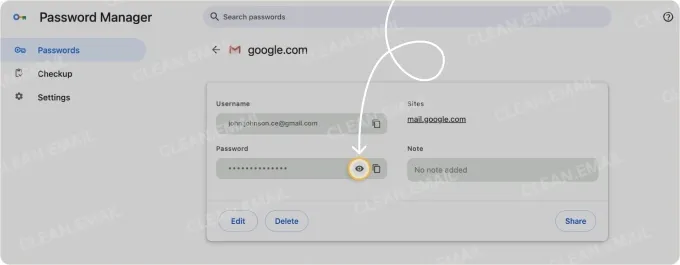
Many modern web browsers, such as Chrome and Firefox, include password managers that store saved login information for websites. Users can access their stored passwords through the settings menu.
Why this matters: Highlighting the convenience these tools provide makes it easier for individuals to manage and retrieve their email passwords quickly without resorting to memory recall or note-taking.
Leveraging Account Recovery Options
Email providers often offer account recovery options, allowing users to reset their passwords through alternative methods, such as answering security questions or receiving a code via SMS.
Why this matters: Stating that these methods provide a safety net enables users to regain access to their accounts even if they've forgotten their passwords.
Checking Saved Passwords on Mobile Devices
Smartphones typically have built-in password management systems that save credentials entered in apps and browsers. Accessing these can reveal stored email passwords.
Why this matters: Providing assurance that this feature exists allows users to tap into their device's functionality, simplifying the process of retrieving forgotten passwords.
Using Third-Party Password Recovery Tools
Various third-party applications can assist users in recovering forgotten passwords by scanning local data or offering brute force attacks on basic security systems.
Why this matters: Emphasizing the availability of these tools informs users that extra resources exist for recovery, potentially saving time and effort in the search for their passwords.
Consulting Security Teams or IT Departments
For organizations, reaching out to security teams or IT departments can often lead to password recovery support as they have the protocols in place to assist users in regaining access to accounts.
Why this matters: Highlighting this option ensures that individuals in corporate settings know they have resources available, which can lead to faster recovery processes.
Reviewing Email Provider Help Centers
Most email providers maintain extensive help centers with articles detailing the process for recovery, including navigating through recovery options and resetting passwords.
Why this matters: By encouraging users to explore these resources, it fosters a sense of empowerment regarding how to obtain necessary information for account recovery.
Engaging User Community Forums
Many email services have community-driven forums where users share experiences and solutions regarding password recovery and other similar issues.
Why this matters: Asking for advice or reading others' resolutions can provide unique insights that are not found in official documentation, potentially leading to faster solutions.
Understanding Email Password Recovery
What should I do if I've forgotten my email password?
If you’ve forgotten your email password, start by visiting the login page of your email provider. Look for the "Forgot password?" link, which typically will guide you through the recovery process using alternative methods like mobile verification or security questions.
Can I recover my email password without access to recovery options?
Is it safe to use third-party tools to recover my email password?
Using third-party tools to recover your email password brings significant risks, such as exposing your data to security threats. It's generally safer to utilize the official recovery options provided by your email service.
What should I do if I suspect my email has been hacked?
If you think your email has been hacked, change your password immediately and review your account settings. Additionally, check for unusual activity and consider enabling two-factor authentication for added security.
When it comes to finding an email password, the biggest takeaway is to prioritize security and stay respectful of privacy. Remember, it’s important to be cautious and ethical in any action involving someone's account. If you're facing challenges with your own passwords, utilize built-in recovery options offered by your provider. And if you ever sense that your account may have been compromised, don’t hesitate to check out resources on how to identify if your email is hacked. Stay safe out there, and keep your online activities secure!




