Email isn’t just a way to communicate; it’s a lifeline connecting us to opportunities, information, and relationships. The journey of your email—from the moment you hit send to when it lands in someone else's inbox—holds significance beyond mere convenience. Understanding how this process works can save you time, enhance your communication efficiency, and ensure vital messages reach their destination.

You might have noticed that some emails land smoothly while others get lost in the shuffle. This isn't just about technology; it’s about the systems that manage these crucial interactions. Knowing how your email gets delivered can empower you to take control of your communication.
If you want to make the most of this tool, understanding its mechanics is essential. With just a little insight, you can transform your email habits, ensuring your messages are seen and read.
This isn't just theoretical; it’s practical information you can use daily. For instance, if you're using Gmail, understanding how to manage your emails, including archived messages, can sharpen your workflow. Learning the nuances allows you to stay connected without the anxiety of missed emails.
Core Concepts of Email Delivery and Tracking
Understanding how your email finds its way to your inbox involves several core elements. Here’s a breakdown of the process from sending to receiving.
1. Email Composition
The journey begins when you compose an email. This includes the subject, body, and recipient addresses. Properly formatted content with a clear subject line boosts the chances of reaching the destination inbox.
2. Sending Server
Once you hit send, your email client connects to your email service provider's server. The sending server checks the recipient's address for validity using the Domain Name System (DNS). This step ensures the recipient's domain is reachable.
3. SMTP Protocol
Your email is transmitted using the Simple Mail Transfer Protocol (SMTP). This protocol facilitates communication between mail servers, relaying your email across the internet. It acts as the backbone of email delivery.
4. Recipient's Mail Server
Upon reaching the recipient's server, the email is processed and checked for spam filters. This includes evaluating the sender's reputation and scanning for malicious attachments or links. A positive reputation means a smoother passage.
5. Delivery Confirmation
After passing through security checks, the email is placed in the recipient's mailbox. The recipient's email client retrieves and displays the email. Some platforms notify senders when their message is opened, providing valuable delivery feedback.
6. Email Retrieval
The recipient checks their inbox via various protocols like IMAP or POP3. IMAP allows for syncing across devices, while POP3 typically downloads emails to a single device. This behavior can affect how and when the recipient accesses your message.
7. Email Archiving
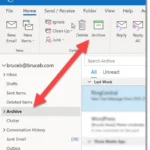
Emails can be archived for later retrieval, often facilitated by built-in features of modern email systems. For instance, archiving allows users to keep their inbox clean without losing important messages. This can be crucial for effective email management. You can learn more about archiving in this article.
8. Email Analytics
Many services provide analytics on email delivery, open rates, and click-through rates. This data allows senders to understand audience engagement and improve future communications.
| Element | Description |
|---|---|
| Email Composition | Creating content with a clear subject and body. |
| Sending Server | Connects and validates the recipient's address. |
| SMTP Protocol | Protocols that relay email across the internet. |
| Recipient's Mail Server | Processes email and checks for spam. |
| Delivery Confirmation | Notifies when an email is opened. |
| Email Retrieval | How the recipient accesses the email. |
| Email Archiving | Allows users to keep emails organized and accessible. |
| Email Analytics | Provides insights into engagement and performance. |
Each of these elements plays a vital role in the successful delivery and management of emails, contributing to broader communication strategies in both personal and professional contexts.
Seven Real-World Applications of "How Your Email Finds Me"
Enhancing Customer Engagement
Utilizing direct email campaigns allows businesses to engage customers with personalized content, promotions, and updates tailored to their interests.
Why this matters: Highlighting the importance of personal connection helps build brand loyalty and keeps customers informed about relevant offerings.
Streamlining Internal Communication
Implementing company-wide mailing lists ensures that all team members stay informed about essential updates and announcements, reducing information silos.
Why this matters: By keeping everyone on the same page, efficiency increases, fostering a culture of collaboration.
Facilitating Real-Time Feedback
Sending surveys via email enables organizations to gather real-time feedback from customers or employees after significant interactions or events.
Why this matters: Asking for immediate feedback allows organizations to quickly adapt and improve their services based on direct input.
Automating Response Systems
Utilizing autoresponders in email systems can provide immediate replies to inquiries, ensuring that recipients receive timely acknowledgment of their messages.
Why this matters: Stating the value of immediate responses enhances customer satisfaction by reducing perceived wait times.
Improving Event Management
Employing email invitations for events allows organizers to manage RSVPs effectively and keep attendees updated on important information.
Why this matters: Providing clear communication prevents confusion and helps maximize attendance by ensuring participants have all necessary details.
Enhancing Security Protocols
Integrating two-factor authentication notifications via email helps safeguard accounts against unauthorized access, enhancing overall cybersecurity.
Why this matters: Highlighting the importance of security ensures that users are vigilant about protecting their personal information.
Optimizing Email Marketing Metrics
Tracking open and click-through rates in email campaigns provides insights into audience behavior, allowing for better-targeted future communications.
Why this matters: By keeping a close watch on engagement metrics, businesses can refine their approaches to meet audience preferences more accurately.
Understanding How Emails Discover You
How does my email address get found by companies or marketers?
Your email address can be found by companies mainly through data collection methods, including sign-ups for newsletters, accounts, or third-party sharing. Many businesses engage in data partnerships to expand their reach and target audience.
What happens to my email data after I share it online?
Once you share your email, it may be stored in databases used for marketing purposes or sold to other entities. Some organizations might also employ analytics to identify trends or user behaviors based on that data.
Can I prevent my email from being discovered by search engines?
While you can reduce your visibility, completely preventing search engines from finding your email is challenging. Adjusting privacy settings on social media and avoiding public forums can help, but there’s no foolproof way to guarantee anonymity.
What are the risks of my email being publicly accessible?
Having your email address publicly accessible can lead to unwanted spam, phishing attempts, or even identity theft. It's important to be cautious about where and how you share your email to mitigate these risks.
Knowing how your email navigates through the digital landscape can make all the difference in ensuring your messages land right where you want them to. It boils down to understanding those behind-the-scenes processes and using that knowledge to maintain good practices. So, while you might not need to become an email expert overnight, being mindful of how emails work can help you stay connected and efficient. Want to enhance your email experience even further? Check out how to see archived emails in Gmail for better management. Embrace your inbox with confidence—you've got this!