
Have you ever hit "send" on an email only to realize seconds later that it was a huge mistake? It’s a stressful moment—one that makes you wonder if deleting that email might actually erase it from existence. Spoiler alert: it doesn’t work that way, and knowing why can save you from a lot of headaches in the future. 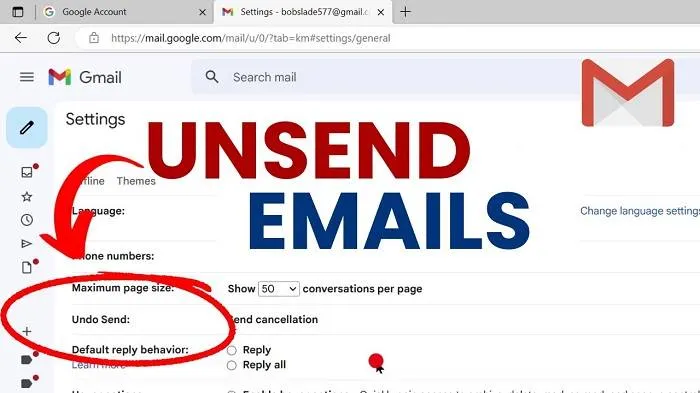
In this digital age, emails are part of our everyday communication, and once they’re sent, the control you thought you had is often just an illusion. Understanding how email systems work, especially when it comes to deleting and unsending, is vital. Whether it's a quick note or a crucial proposal, mistakes happen, and knowing your options can make a world of difference.
If you've ever forwarded something you shouldn't have, or hit "reply all" instead of "reply," you know how important it can be to act quickly. While deleting might seem like the best solution to erase your mishap, there’s much more to the story. Let’s unpack what actually happens when you delete an email and what you can do if you need to retract a message after it’s sent.
Understanding the Dynamics of Email Deletion and Unsending
When you send an email, whether it's for personal or professional communication, the expectation is that it reaches the recipient's inbox. But what happens if you hit "send" and immediately wish you could take it back? The question arises: does deleting an email unsend it? Let’s explore the core elements surrounding this issue.
- Email Deletion Basics: Deleting an email from your sent folder does not retract it from the recipient's inbox. Emails are stored on the recipient's server as soon as they are sent, meaning they are no longer under your control.
- Unsend Features: Some email platforms, like Gmail or Outlook, offer an "unsend" feature that allows users to cancel a sent email within a brief window (generally a few seconds). However, this option must be activated before the message is sent, and it’s not the same as deleting an email afterward.
- Recipient Interaction: If the recipient has already opened the email, deleting it from your end won't remove it from their view. They will still have access to the content, making deletion ineffective for rectifying immediate concerns.
- Email Retention Policies: Many organizations utilize email retention policies, which keep copies of emails for compliance or legal reasons. Deleting an email doesn’t necessarily eliminate it from corporate archives.
- Audit Trails: Some email applications create audit trails or logs of email activity. Even if you delete a message, this log can maintain a record of its existence.
Here’s a simplified comparison of common email interactions related to deletion and unsending:
| Action | Effect on Sender | Effect on Recipient |
|---|---|---|
| Delete from Sent Folder | Removes from sender's view | Message remains visible |
| Use Unsend Feature | Retracts message within set time | Message is not received |
| Delete After Receipt | No effect on email status | Message is already viewed |
| Request Recipient to Delete | Uncertain compliance | Recipient can disregard |
Understanding these core concepts clarifies the limitations of email deletion and the nuances that come with unsending features. For scenarios involving Outlook, you can learn more about unsending features here.
Real-World Insights on Deleting Emails and the Concept of Unsending
Corporate Communication Blunders
In a corporate setting, sending an email to the wrong recipient can lead to misunderstandings or sensitive information being disclosed. If the email is deleted after sending, it remains in the recipient's inbox, rendering the deletion ineffective.
Why this matters: Highlighting the importance of double-checking email addresses before hitting send can prevent data leaks in a professional environment.
Personal Email Mishaps
When someone accidentally sends a personal message to a work email contact, deleting it from their sent folder doesn’t erase the message from the recipient's inbox. This can create awkward situations, especially if the message was meant for someone else.
Why this matters: Stating the potential for embarrassment in personal communications emphasizes the need for caution when sending emails.
Legal and Compliance Considerations
In industries governed by strict regulations, deleting an email that contains compliance-related content does not nullify its legal existence once sent. The email could still be recoverable through various means, keeping organizations exposed to legal scrutiny.
Why this matters: Providing insight into legal ramifications stresses the importance of understanding email retention policies and best practices.
Email Recall Features in Platforms
Some email platforms offer a recall feature, allowing users to retract emails before they are read. However, deleting an email does not function in the same way, and once read, the email cannot be unsent.
Why this matters: Asking users to explore platform-specific functionalities encourages informed email management and awareness of available tools.
Potential for Miscommunication
Deleting an email without confirmation can create gaps in communication, especially in teams relying on email for project updates and discussions. If deleted, the relevant information may not be accessible to all parties involved.
Why this matters: By keeping lines of communication open, ensuring visibility of crucial discussions can improve team collaboration.
Social Media and Email Integration
With increasing integration between social media and email platforms, deleting a message sent through an integrated service doesn't prevent the recipient from viewing or interacting with it on social media.
Why this matters: Providing awareness of integration functionalities underlines the complexity of digital communication channels and their implications.
Email Spam and Management Tools
When managing unsolicited emails, deleting them from the inbox only removes them from the user’s perspective. The sender still retains the email for potential follow-up or spam purposes, which could lead to unwanted communications.
Why this matters: Highlighting ways to manage spam and unwanted emails emphasizes the importance of utilizing email filters and understanding sender intentions.
Your Questions About Email Deletion and Unsending
Does deleting an email mean it’s unsent?
Deleting an email from your sent folder does not unsend it. The email remains in the recipient's inbox, so they can still read it unless they delete it themselves.
What happens if I delete an email I sent?
If you delete the email you sent, it only removes it from your own account. The recipient will still have access to the email unless they delete it.
Can I recall an email after sending it?
Some email services like Microsoft Outlook allow you to recall an email, but it requires specific settings. Even then, the success of recalling an email heavily depends on factors like whether the recipient has read it or their email settings.
Is there a way to unsend an email after delivering it?
Once an email is delivered, there's no universal way to unsend it. Some platforms have short delays for retraction, but it's not guaranteed. The safest route is to send a follow-up email clarifying or correcting any errors.
While hitting "delete" might feel like a solid way to erase your mistakes, it doesn’t truly unsend your email. Once it's out there, it’s generally beyond your control. Understanding how different email services handle deletions can save you from future mishaps. So next time you’re about to send something questionable, take a moment to double-check or consider a draft instead. Stay aware and take that extra step to keep your communication smooth and professional. You've got this!




