
Have you ever hit "send" on an email, only to immediately regret it? You're not alone. We've all been there—whether it's a typo, an accidental "Reply All," or sending something before it's ready. The moment can feel like a pit in your stomach, but what if I told you there's a chance to hit rewind? 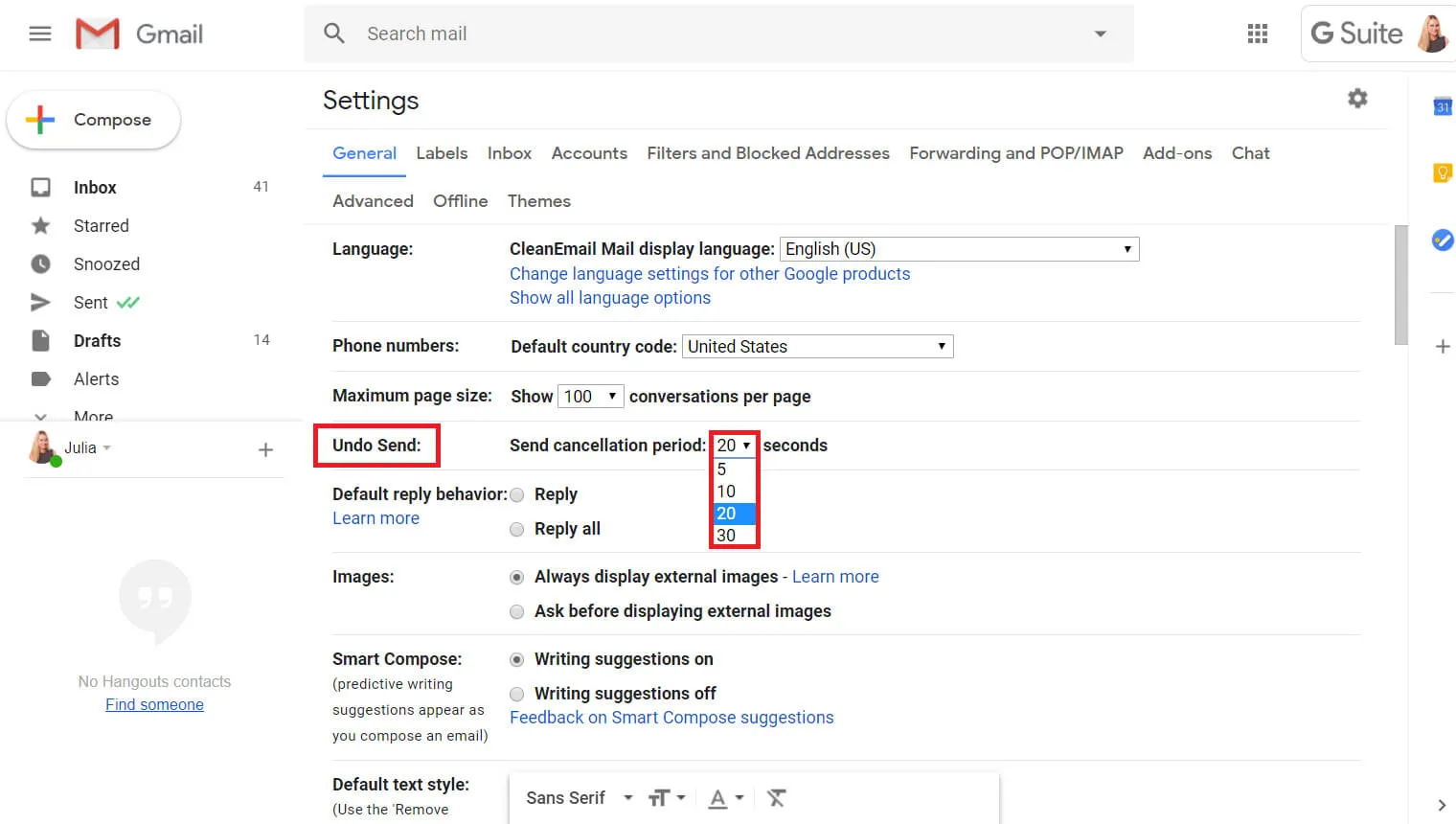
Understanding how to unsend an email can save you from potential embarrassment and confusion. This isn't just about fixing mistakes; it's about maintaining professionalism and control over your correspondence. In a fast-paced digital world, knowing your options can significantly ease the pressure of email communication.
Before diving into how this works across popular platforms like Gmail and Outlook, consider the importance of timing and settings in this process. Different email services offer varying degrees of flexibility when it comes to retracting sent messages. Let's explore what you can do, and how you can stay in command of your online interactions.
If you're specifically using Outlook, you can learn more about how to unsend emails and preserve your professional image in a separate article we have available.
Understanding Core Elements of Unsent Emails
Unsending emails has become an essential feature in modern communication, allowing individuals to retract messages that may have been sent in error. This capability is particularly useful in professional settings where communication must be clear and precise. Here’s a straightforward breakdown of how this works and what you need to know.
Core Concepts Behind Unsend Features
Different email platforms handle the concept of unsending emails in various ways. Here are the common elements:
- Time Limitations: Most services impose a time frame within which an email can be retracted. This range typically spans from a few seconds to a couple of minutes after hitting send.
- Notification Features: When an email is unsent, some platforms notify the recipient, while others do not. This could lead to misunderstandings, as the recipient might assume they never received the email at all.
- Privacy Settings: Ensuring that unsend options comply with privacy regulations is vital. Some platforms allow users to unsend emails, but not all email recipients may appreciate this feature due to concerns over data ownership.
Functionality Variations Across Platforms
Here’s how unsending works across popular email platforms:
| Email Service | Unsend Capability | Time Frame | Recipient Notification |
|---|---|---|---|
| Gmail | Yes | 5-30 seconds | No |
| Outlook | Yes | Varies | Yes |
| Yahoo Mail | No | N/A | N/A |
| Apple Mail | No | N/A | N/A |
Advantages and Disadvantages
Exploring the pros and cons of unsending emails can clarify whether this feature is suitable for your needs:
- Advantages:
- Helps correct mistakes quickly, reducing the chances of misunderstandings.
- Offers a safety net for hasty communications.
- Enhances user control over sent communications.
- Disadvantages:
- Time constraints might not be sufficient for some users.
- Recipient notifications can lead to awkward situations.
- Not all platforms provide this feature, limiting its effectiveness across different email services.
For more specific details on unsending emails within professional environments, you can review How To Unsend An Email On Outlook For Professional Communication.
Practical Applications of Email Unsending Features
Recovering from Mistakes
Accidentally sending an email with a typo or incorrect information can have serious consequences. Many email platforms allow users to unsend messages within a short window, providing a chance to correct mistakes quickly.
Why this matters: Highlighting the ability to unsend emails helps in mitigating errors that can complicate professional communication.
Preventing Miscommunication
In high-stakes situations, such as legal or financial correspondence, miscommunication can lead to costly repercussions. Unsending emails lets users retract messages that could be misinterpreted or misused.
Why this matters: Stating the importance of clear communication, especially in critical discussions, reinforces the value of being able to unsend an email.
Maintaining Professionalism
When engaging with clients, business partners, or colleagues, sending an email that may come across as unprofessional can tarnish relationships. The ability to unsend such emails allows for maintaining a polished image.
Why this matters: Providing a safety net for maintaining professionalism boosts confidence when sending important communications.
Adjusting for Changes
Situations often change after an email has been sent, requiring updates or retractions. Being able to unsend emails allows individuals to adapt to new developments without leaving outdated or misleading information in inboxes.
Why this matters: Asking users to consider the dynamic nature of communication underscores the necessity of such features for timely updates.
Shortening Response Times
In fast-paced environments, immediate feedback may lead to hasty emails. Unsending provides a buffer, enabling users to think again about their messages before they land in the recipient's inbox.
Why this matters: Emphasizing the significance of taking a moment to reassess messages can enhance overall communication quality in busy workplaces.
Avoiding Emotional Responses
In moments of frustration or anger, individuals might impulsively send an email. With the unsend feature, there's an opportunity to reconsider and redirect that communication in a more constructive way.
Why this matters: Providing a chance for emotional regulation helps maintain a respectful tone in professional exchanges, which is essential for effective teamwork.
Reinforcing Privacy
Sending confidential information by mistake can breach privacy. Unsending helps manage sensitive data, allowing users to retract emails that inadvertently share such content.
Why this matters: Highlighting the responsibility of handling confidential information fosters a culture of trust and security within communication networks.
Your Questions on Unsent Emails Answered
How does the unsend feature work in email applications?
The unsend feature generally allows you to recall or retract a message within a specific time frame after it has been sent. Popular email services like Gmail and Outlook provide a window—usually seconds—where you can cancel the sending process before the email reaches the recipient.
What happens if I try to unsend an email after the time limit?
If you attempt to unsend an email after the designated time frame, it won't work. The email is already in the recipient's inbox, and you’ll need to send a follow-up message if you want to clarify or apologize for any errors.
Can the recipient see that I tried to unsend an email?
No, recipients don't receive any notification if you attempt to unsend an email. However, they will see whatever was sent, so it's essential to act quickly if you realize there's an error.
Are there any email clients that allow you to unsend emails after more than a few seconds?
Most email clients, including popular ones like Gmail and Outlook, limit the unsend feature to a short window. There are no widely-used email applications that allow you to retract an email after it has been delivered, so it’s always best to check your message before hitting send.
Remember, while many email services offer a way to unsend messages within a limited window, it's not a fail-safe solution. Always double-check your emails before hitting send to minimize any chance of needing to retract that message later. And if you're using Outlook, the process can be a breeze with just a few steps—check out our article on how to unsend an email on Outlook for the details. Don't sweat it if you slip up; everyone has sent that one email they wished they could take back. Just stay aware and let your inbox work for you, not against you!




